 ROS Index
Repository Summary
| Checkout URI | https://github.com/vtalpaert/ros2-phone-sensors.git |
| VCS Type | git |
| VCS Version | main |
| Last Updated | 2026-02-27 |
| Dev Status | DEVELOPED |
| Released | UNRELEASED |
| Contributing |
Help Wanted (-)
Good First Issues (-) Pull Requests to Review (-) |
Packages
| Name | Version |
|---|---|
| phone_sensors_bridge | 0.0.0 |
| phone_sensors_bridge_examples | 0.0.0 |
README
Use your phone as a sensor in ROS2
While many projects exist to control your robot from your phone, this project is the other way around; your phone is the robot’ sensors ! It will send the camera feed, IMU and GPS so that you may integrate the phone onto a mobile base.
The particularity of this project is that it relies on the mobile browser instead of a specific app. A webpage is served from the ROS2 node, opening the page from a mobile client will ask for permissions in the browser. The data is transmitted between the server and client using websockets for a modern and fast communication, as opposed to making HTTP requests or streaming UDP.
This repository is inspired by a project I did with students as a TA called phone-imu.
Build
source /opt/ros/humble/setup.bash
rosdep install -i --from-path src --rosdistro humble -y --ignore-src
colcon build --packages-up-to phone_sensors_bridge
# Or build for development, but remember to clean and rebuild every time the JS files are changed
# colcon build --symlink-install  --packages-up-to phone_sensors_bridge_examples --event-handlers console_direct+
phone_sensors_bridge usage
Quickstart
Run the following in a different terminal than the one used for building, otherwise the server might start from inside the build folder which will not contain the template and static folders for the webpage.
source install/setup.bash

# Ubuntu IP
EXTRA_IP=$(ip route get 8.8.8.8 | grep -oP 'src \K[^ ]+')
echo "My IP is $EXTRA_IP"
# Generate SSL certificates for local webserver
ros2 run phone_sensors_bridge generate_dev_certificates.sh $EXTRA_IP

# Start server
ros2 run phone_sensors_bridge server --ros-args -p video_width:=1280 -p video_height:=720
Open the webpage from your mobile device. The URL contains the server host IP where the node is running. It depends on your network, but most likely is https://<EXTRA_IP>:2000.
If you have multiple network interfaces, favour the fastest such as ethernet over wifi.
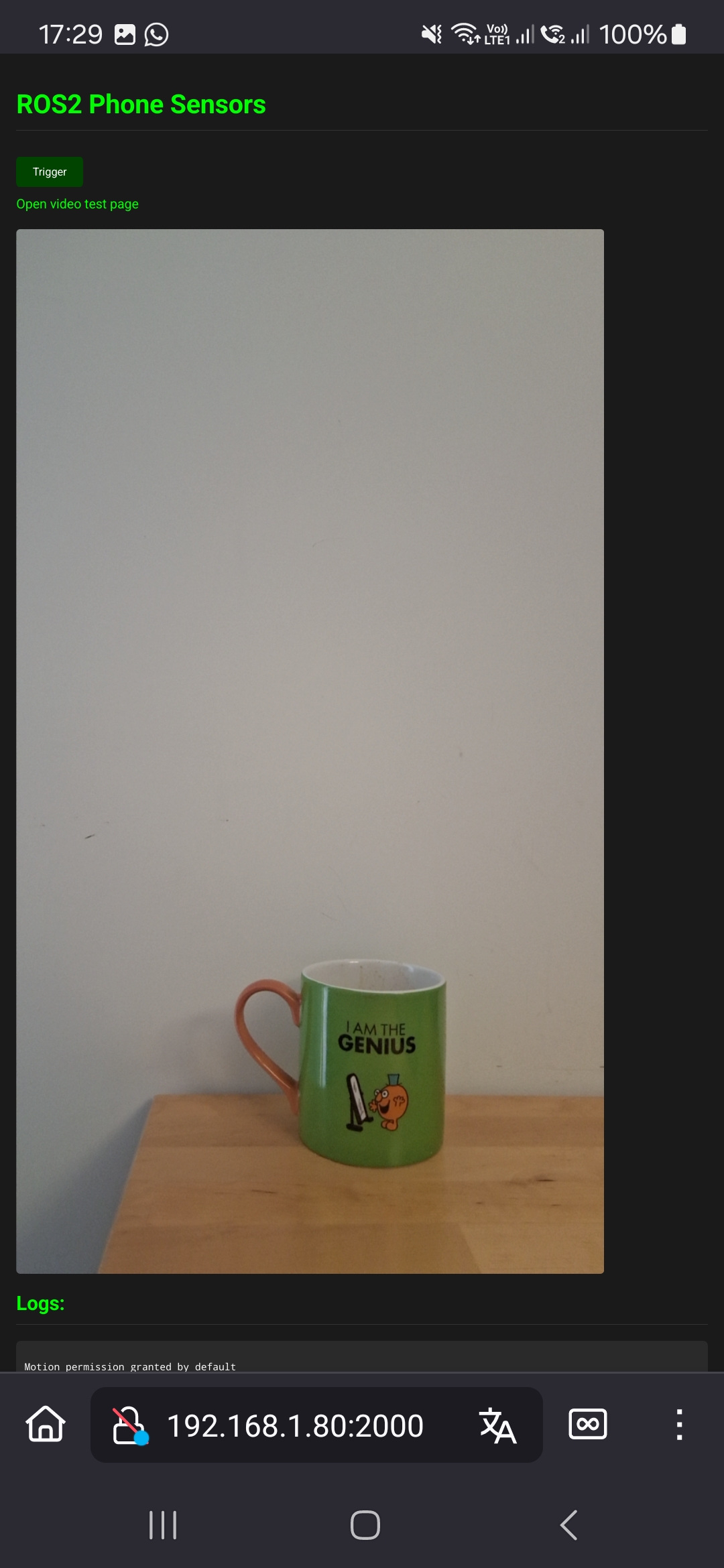
The page will prompt for permissions, then display the chosen camera
Published topics
| Topic | Type | Description |
|---|---|---|
time/device |
sensor_msgs/TimeReference |
Device system clock versus ROS time |
time/gnss |
sensor_msgs/TimeReference |
GNSS fix acquisition time versus device clock |
imu |
sensor_msgs/Imu |
Orientation (ENU quaternion), angular velocity and linear acceleration in the device frame |
gnss |
sensor_msgs/NavSatFix |
GPS fix: latitude, longitude, altitude with horizontal/vertical accuracy covariance |
gnss/odometry |
nav_msgs/Odometry |
GPS-derived velocity in the ENU frame; pose covariance is 1e9 (fuse twist only) |
camera1/image_raw |
sensor_msgs/Image |
Camera 1 video stream |
camera2/image_raw |
sensor_msgs/Image |
Camera 2 video stream |
camera1/camera_info |
sensor_msgs/CameraInfo |
Camera 1 calibration (only published when camera1_calibration_file is set) |
camera2/camera_info |
sensor_msgs/CameraInfo |
Camera 2 calibration (only published when camera2_calibration_file is set) |
Parameters
| Name | Type | Default | Unit | Description |
|---|---|---|---|---|
host |
string | “0.0.0.0” | IP | Use 0.0.0.0 to accept connections outside of localhost |
port |
int | 2000 | The port where the server listens on | |
debug |
bool | True | Use Flask in debug mode | |
secret_key |
string | “secret!” | Flask SECRET_KEY | |
ssl_certificate |
string | “certs/certificate.crt” | path | Path to public SSL certificate |
ssl_private_key |
string | “certs/private.key” | path | Path to private SSL key |
use_ros_time |
bool | False | Use ROS time instead of device time for message timestamps | |
time_reference_source_device |
string | “ros_to_device” | Source identifier for device TimeReference messages | |
time_reference_source_gnss |
string | “device_to_gnss” | Source identifier for GNSS TimeReference messages | |
time_reference_frequency |
float | -1.0 | Hz | Rate to emit TimeReference data |
imu_frequency |
float | 50.0 | Hz | Rate to emit IMU data |
gnss_frequency |
float | 10.0 | Hz | Rate to emit GNSS data (polling mode only) |
frame_id_imu |
string | package_name | Frame ID for IMU messages | |
frame_id_gnss |
string | package_name | Frame ID for GNSS messages | |
frame_id_image_camera1 |
string | package_name_camera1 | Frame ID for camera1 image messages | |
frame_id_image_camera2 |
string | package_name_camera2 | Frame ID for camera2 image messages | |
camera1_device_label |
string | “Facing front:3” | Label to identify which camera to use for camera1 | |
camera1_video_fps |
float | 20.0 | Hz | Video frame rate for camera1 |
camera1_video_width |
int | 720 | pixels | Video frame width for camera1 |
camera1_video_height |
int | 720 | pixels | Video frame height for camera1 |
camera1_video_compression |
float | 0.3 | 0-1 | JPEG compression quality for camera1 (0=max compression, 1=best quality) |
camera1_calibration_file |
string | ”” | path | Path to camera1 calibration YAML file (output from camera_calibration) |
camera2_device_label |
string | “Facing back:0” | Label to identify which camera to use for camera2 | |
camera2_video_fps |
float | 20.0 | Hz | Video frame rate for camera2 |
camera2_video_width |
int | 720 | pixels | Video frame width for camera2 |
camera2_video_height |
int | 720 | pixels | Video frame height for camera2 |
camera2_video_compression |
float | 0.3 | 0-1 | JPEG compression quality for camera2 (0=max compression, 1=best quality) |
camera2_calibration_file |
string | ”” | path | Path to camera2 calibration YAML file (output from camera_calibration) |
A negative value for the time reference, IMU, GNSS frequencies or video FPS will disable sending the corresponding data from the client device. This allows conserving bandwidth and processing power when certain sensors are not needed.
Note: gnss_frequency only takes effect when useWatchPosition is set to false in geolocation.js. When watchPosition is used (the current default), the browser controls the GPS update rate and this parameter is ignored.
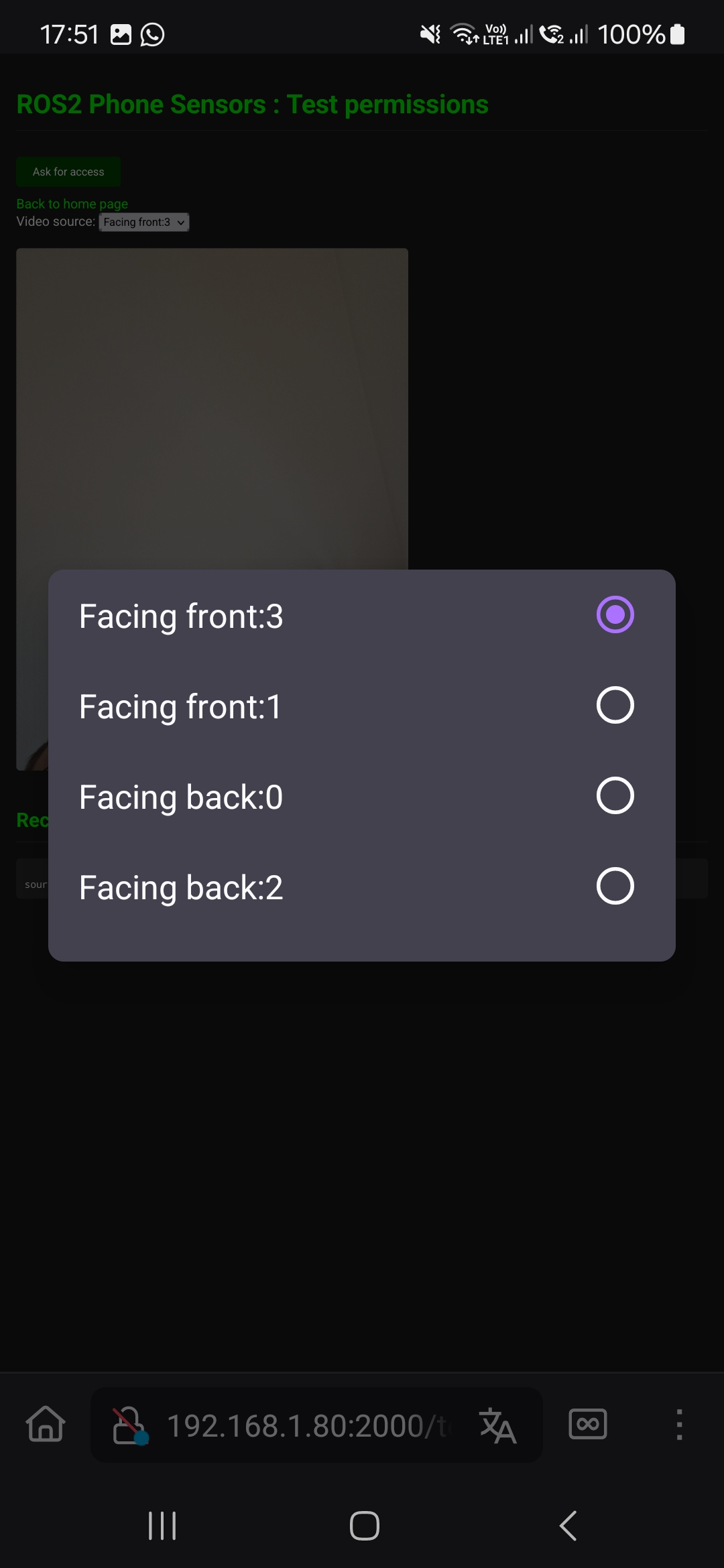
To find out the available camera1_device_label and camera2_device_label, open the video test page
File truncated at 100 lines see the full file
CONTRIBUTING
Repository Summary
| Checkout URI | https://github.com/vtalpaert/ros2-phone-sensors.git |
| VCS Type | git |
| VCS Version | main |
| Last Updated | 2026-02-27 |
| Dev Status | DEVELOPED |
| Released | UNRELEASED |
| Contributing |
Help Wanted (-)
Good First Issues (-) Pull Requests to Review (-) |
Packages
| Name | Version |
|---|---|
| phone_sensors_bridge | 0.0.0 |
| phone_sensors_bridge_examples | 0.0.0 |
README
Use your phone as a sensor in ROS2
While many projects exist to control your robot from your phone, this project is the other way around; your phone is the robot’ sensors ! It will send the camera feed, IMU and GPS so that you may integrate the phone onto a mobile base.
The particularity of this project is that it relies on the mobile browser instead of a specific app. A webpage is served from the ROS2 node, opening the page from a mobile client will ask for permissions in the browser. The data is transmitted between the server and client using websockets for a modern and fast communication, as opposed to making HTTP requests or streaming UDP.
This repository is inspired by a project I did with students as a TA called phone-imu.
Build
source /opt/ros/humble/setup.bash
rosdep install -i --from-path src --rosdistro humble -y --ignore-src
colcon build --packages-up-to phone_sensors_bridge
# Or build for development, but remember to clean and rebuild every time the JS files are changed
# colcon build --symlink-install  --packages-up-to phone_sensors_bridge_examples --event-handlers console_direct+
phone_sensors_bridge usage
Quickstart
Run the following in a different terminal than the one used for building, otherwise the server might start from inside the build folder which will not contain the template and static folders for the webpage.
source install/setup.bash

# Ubuntu IP
EXTRA_IP=$(ip route get 8.8.8.8 | grep -oP 'src \K[^ ]+')
echo "My IP is $EXTRA_IP"
# Generate SSL certificates for local webserver
ros2 run phone_sensors_bridge generate_dev_certificates.sh $EXTRA_IP

# Start server
ros2 run phone_sensors_bridge server --ros-args -p video_width:=1280 -p video_height:=720
Open the webpage from your mobile device. The URL contains the server host IP where the node is running. It depends on your network, but most likely is https://<EXTRA_IP>:2000.
If you have multiple network interfaces, favour the fastest such as ethernet over wifi.
The page will prompt for permissions, then display the chosen camera
Published topics
| Topic | Type | Description |
|---|---|---|
time/device |
sensor_msgs/TimeReference |
Device system clock versus ROS time |
time/gnss |
sensor_msgs/TimeReference |
GNSS fix acquisition time versus device clock |
imu |
sensor_msgs/Imu |
Orientation (ENU quaternion), angular velocity and linear acceleration in the device frame |
gnss |
sensor_msgs/NavSatFix |
GPS fix: latitude, longitude, altitude with horizontal/vertical accuracy covariance |
gnss/odometry |
nav_msgs/Odometry |
GPS-derived velocity in the ENU frame; pose covariance is 1e9 (fuse twist only) |
camera1/image_raw |
sensor_msgs/Image |
Camera 1 video stream |
camera2/image_raw |
sensor_msgs/Image |
Camera 2 video stream |
camera1/camera_info |
sensor_msgs/CameraInfo |
Camera 1 calibration (only published when camera1_calibration_file is set) |
camera2/camera_info |
sensor_msgs/CameraInfo |
Camera 2 calibration (only published when camera2_calibration_file is set) |
Parameters
| Name | Type | Default | Unit | Description |
|---|---|---|---|---|
host |
string | “0.0.0.0” | IP | Use 0.0.0.0 to accept connections outside of localhost |
port |
int | 2000 | The port where the server listens on | |
debug |
bool | True | Use Flask in debug mode | |
secret_key |
string | “secret!” | Flask SECRET_KEY | |
ssl_certificate |
string | “certs/certificate.crt” | path | Path to public SSL certificate |
ssl_private_key |
string | “certs/private.key” | path | Path to private SSL key |
use_ros_time |
bool | False | Use ROS time instead of device time for message timestamps | |
time_reference_source_device |
string | “ros_to_device” | Source identifier for device TimeReference messages | |
time_reference_source_gnss |
string | “device_to_gnss” | Source identifier for GNSS TimeReference messages | |
time_reference_frequency |
float | -1.0 | Hz | Rate to emit TimeReference data |
imu_frequency |
float | 50.0 | Hz | Rate to emit IMU data |
gnss_frequency |
float | 10.0 | Hz | Rate to emit GNSS data (polling mode only) |
frame_id_imu |
string | package_name | Frame ID for IMU messages | |
frame_id_gnss |
string | package_name | Frame ID for GNSS messages | |
frame_id_image_camera1 |
string | package_name_camera1 | Frame ID for camera1 image messages | |
frame_id_image_camera2 |
string | package_name_camera2 | Frame ID for camera2 image messages | |
camera1_device_label |
string | “Facing front:3” | Label to identify which camera to use for camera1 | |
camera1_video_fps |
float | 20.0 | Hz | Video frame rate for camera1 |
camera1_video_width |
int | 720 | pixels | Video frame width for camera1 |
camera1_video_height |
int | 720 | pixels | Video frame height for camera1 |
camera1_video_compression |
float | 0.3 | 0-1 | JPEG compression quality for camera1 (0=max compression, 1=best quality) |
camera1_calibration_file |
string | ”” | path | Path to camera1 calibration YAML file (output from camera_calibration) |
camera2_device_label |
string | “Facing back:0” | Label to identify which camera to use for camera2 | |
camera2_video_fps |
float | 20.0 | Hz | Video frame rate for camera2 |
camera2_video_width |
int | 720 | pixels | Video frame width for camera2 |
camera2_video_height |
int | 720 | pixels | Video frame height for camera2 |
camera2_video_compression |
float | 0.3 | 0-1 | JPEG compression quality for camera2 (0=max compression, 1=best quality) |
camera2_calibration_file |
string | ”” | path | Path to camera2 calibration YAML file (output from camera_calibration) |
A negative value for the time reference, IMU, GNSS frequencies or video FPS will disable sending the corresponding data from the client device. This allows conserving bandwidth and processing power when certain sensors are not needed.
Note: gnss_frequency only takes effect when useWatchPosition is set to false in geolocation.js. When watchPosition is used (the current default), the browser controls the GPS update rate and this parameter is ignored.
To find out the available camera1_device_label and camera2_device_label, open the video test page
File truncated at 100 lines see the full file
CONTRIBUTING
Repository Summary
| Checkout URI | https://github.com/vtalpaert/ros2-phone-sensors.git |
| VCS Type | git |
| VCS Version | main |
| Last Updated | 2026-02-27 |
| Dev Status | DEVELOPED |
| Released | UNRELEASED |
| Contributing |
Help Wanted (-)
Good First Issues (-) Pull Requests to Review (-) |
Packages
| Name | Version |
|---|---|
| phone_sensors_bridge | 0.0.0 |
| phone_sensors_bridge_examples | 0.0.0 |
README
Use your phone as a sensor in ROS2
While many projects exist to control your robot from your phone, this project is the other way around; your phone is the robot’ sensors ! It will send the camera feed, IMU and GPS so that you may integrate the phone onto a mobile base.
The particularity of this project is that it relies on the mobile browser instead of a specific app. A webpage is served from the ROS2 node, opening the page from a mobile client will ask for permissions in the browser. The data is transmitted between the server and client using websockets for a modern and fast communication, as opposed to making HTTP requests or streaming UDP.
This repository is inspired by a project I did with students as a TA called phone-imu.
Build
source /opt/ros/humble/setup.bash
rosdep install -i --from-path src --rosdistro humble -y --ignore-src
colcon build --packages-up-to phone_sensors_bridge
# Or build for development, but remember to clean and rebuild every time the JS files are changed
# colcon build --symlink-install  --packages-up-to phone_sensors_bridge_examples --event-handlers console_direct+
phone_sensors_bridge usage
Quickstart
Run the following in a different terminal than the one used for building, otherwise the server might start from inside the build folder which will not contain the template and static folders for the webpage.
source install/setup.bash

# Ubuntu IP
EXTRA_IP=$(ip route get 8.8.8.8 | grep -oP 'src \K[^ ]+')
echo "My IP is $EXTRA_IP"
# Generate SSL certificates for local webserver
ros2 run phone_sensors_bridge generate_dev_certificates.sh $EXTRA_IP

# Start server
ros2 run phone_sensors_bridge server --ros-args -p video_width:=1280 -p video_height:=720
Open the webpage from your mobile device. The URL contains the server host IP where the node is running. It depends on your network, but most likely is https://<EXTRA_IP>:2000.
If you have multiple network interfaces, favour the fastest such as ethernet over wifi.
The page will prompt for permissions, then display the chosen camera
Published topics
| Topic | Type | Description |
|---|---|---|
time/device |
sensor_msgs/TimeReference |
Device system clock versus ROS time |
time/gnss |
sensor_msgs/TimeReference |
GNSS fix acquisition time versus device clock |
imu |
sensor_msgs/Imu |
Orientation (ENU quaternion), angular velocity and linear acceleration in the device frame |
gnss |
sensor_msgs/NavSatFix |
GPS fix: latitude, longitude, altitude with horizontal/vertical accuracy covariance |
gnss/odometry |
nav_msgs/Odometry |
GPS-derived velocity in the ENU frame; pose covariance is 1e9 (fuse twist only) |
camera1/image_raw |
sensor_msgs/Image |
Camera 1 video stream |
camera2/image_raw |
sensor_msgs/Image |
Camera 2 video stream |
camera1/camera_info |
sensor_msgs/CameraInfo |
Camera 1 calibration (only published when camera1_calibration_file is set) |
camera2/camera_info |
sensor_msgs/CameraInfo |
Camera 2 calibration (only published when camera2_calibration_file is set) |
Parameters
| Name | Type | Default | Unit | Description |
|---|---|---|---|---|
host |
string | “0.0.0.0” | IP | Use 0.0.0.0 to accept connections outside of localhost |
port |
int | 2000 | The port where the server listens on | |
debug |
bool | True | Use Flask in debug mode | |
secret_key |
string | “secret!” | Flask SECRET_KEY | |
ssl_certificate |
string | “certs/certificate.crt” | path | Path to public SSL certificate |
ssl_private_key |
string | “certs/private.key” | path | Path to private SSL key |
use_ros_time |
bool | False | Use ROS time instead of device time for message timestamps | |
time_reference_source_device |
string | “ros_to_device” | Source identifier for device TimeReference messages | |
time_reference_source_gnss |
string | “device_to_gnss” | Source identifier for GNSS TimeReference messages | |
time_reference_frequency |
float | -1.0 | Hz | Rate to emit TimeReference data |
imu_frequency |
float | 50.0 | Hz | Rate to emit IMU data |
gnss_frequency |
float | 10.0 | Hz | Rate to emit GNSS data (polling mode only) |
frame_id_imu |
string | package_name | Frame ID for IMU messages | |
frame_id_gnss |
string | package_name | Frame ID for GNSS messages | |
frame_id_image_camera1 |
string | package_name_camera1 | Frame ID for camera1 image messages | |
frame_id_image_camera2 |
string | package_name_camera2 | Frame ID for camera2 image messages | |
camera1_device_label |
string | “Facing front:3” | Label to identify which camera to use for camera1 | |
camera1_video_fps |
float | 20.0 | Hz | Video frame rate for camera1 |
camera1_video_width |
int | 720 | pixels | Video frame width for camera1 |
camera1_video_height |
int | 720 | pixels | Video frame height for camera1 |
camera1_video_compression |
float | 0.3 | 0-1 | JPEG compression quality for camera1 (0=max compression, 1=best quality) |
camera1_calibration_file |
string | ”” | path | Path to camera1 calibration YAML file (output from camera_calibration) |
camera2_device_label |
string | “Facing back:0” | Label to identify which camera to use for camera2 | |
camera2_video_fps |
float | 20.0 | Hz | Video frame rate for camera2 |
camera2_video_width |
int | 720 | pixels | Video frame width for camera2 |
camera2_video_height |
int | 720 | pixels | Video frame height for camera2 |
camera2_video_compression |
float | 0.3 | 0-1 | JPEG compression quality for camera2 (0=max compression, 1=best quality) |
camera2_calibration_file |
string | ”” | path | Path to camera2 calibration YAML file (output from camera_calibration) |
A negative value for the time reference, IMU, GNSS frequencies or video FPS will disable sending the corresponding data from the client device. This allows conserving bandwidth and processing power when certain sensors are not needed.
Note: gnss_frequency only takes effect when useWatchPosition is set to false in geolocation.js. When watchPosition is used (the current default), the browser controls the GPS update rate and this parameter is ignored.
To find out the available camera1_device_label and camera2_device_label, open the video test page
File truncated at 100 lines see the full file
CONTRIBUTING

|
phone_sensors_bridge repositoryphone_sensors_bridge phone_sensors_bridge_examples |
ROS Distro
|
Repository Summary
| Checkout URI | https://github.com/vtalpaert/ros2-phone-sensors.git |
| VCS Type | git |
| VCS Version | main |
| Last Updated | 2026-02-27 |
| Dev Status | DEVELOPED |
| Released | UNRELEASED |
| Contributing |
Help Wanted (-)
Good First Issues (-) Pull Requests to Review (-) |
Packages
| Name | Version |
|---|---|
| phone_sensors_bridge | 0.0.0 |
| phone_sensors_bridge_examples | 0.0.0 |
README
Use your phone as a sensor in ROS2
While many projects exist to control your robot from your phone, this project is the other way around; your phone is the robot’ sensors ! It will send the camera feed, IMU and GPS so that you may integrate the phone onto a mobile base.
The particularity of this project is that it relies on the mobile browser instead of a specific app. A webpage is served from the ROS2 node, opening the page from a mobile client will ask for permissions in the browser. The data is transmitted between the server and client using websockets for a modern and fast communication, as opposed to making HTTP requests or streaming UDP.
This repository is inspired by a project I did with students as a TA called phone-imu.
Build
source /opt/ros/humble/setup.bash
rosdep install -i --from-path src --rosdistro humble -y --ignore-src
colcon build --packages-up-to phone_sensors_bridge
# Or build for development, but remember to clean and rebuild every time the JS files are changed
# colcon build --symlink-install  --packages-up-to phone_sensors_bridge_examples --event-handlers console_direct+
phone_sensors_bridge usage
Quickstart
Run the following in a different terminal than the one used for building, otherwise the server might start from inside the build folder which will not contain the template and static folders for the webpage.
source install/setup.bash

# Ubuntu IP
EXTRA_IP=$(ip route get 8.8.8.8 | grep -oP 'src \K[^ ]+')
echo "My IP is $EXTRA_IP"
# Generate SSL certificates for local webserver
ros2 run phone_sensors_bridge generate_dev_certificates.sh $EXTRA_IP

# Start server
ros2 run phone_sensors_bridge server --ros-args -p video_width:=1280 -p video_height:=720
Open the webpage from your mobile device. The URL contains the server host IP where the node is running. It depends on your network, but most likely is https://<EXTRA_IP>:2000.
If you have multiple network interfaces, favour the fastest such as ethernet over wifi.
The page will prompt for permissions, then display the chosen camera
Published topics
| Topic | Type | Description |
|---|---|---|
time/device |
sensor_msgs/TimeReference |
Device system clock versus ROS time |
time/gnss |
sensor_msgs/TimeReference |
GNSS fix acquisition time versus device clock |
imu |
sensor_msgs/Imu |
Orientation (ENU quaternion), angular velocity and linear acceleration in the device frame |
gnss |
sensor_msgs/NavSatFix |
GPS fix: latitude, longitude, altitude with horizontal/vertical accuracy covariance |
gnss/odometry |
nav_msgs/Odometry |
GPS-derived velocity in the ENU frame; pose covariance is 1e9 (fuse twist only) |
camera1/image_raw |
sensor_msgs/Image |
Camera 1 video stream |
camera2/image_raw |
sensor_msgs/Image |
Camera 2 video stream |
camera1/camera_info |
sensor_msgs/CameraInfo |
Camera 1 calibration (only published when camera1_calibration_file is set) |
camera2/camera_info |
sensor_msgs/CameraInfo |
Camera 2 calibration (only published when camera2_calibration_file is set) |
Parameters
| Name | Type | Default | Unit | Description |
|---|---|---|---|---|
host |
string | “0.0.0.0” | IP | Use 0.0.0.0 to accept connections outside of localhost |
port |
int | 2000 | The port where the server listens on | |
debug |
bool | True | Use Flask in debug mode | |
secret_key |
string | “secret!” | Flask SECRET_KEY | |
ssl_certificate |
string | “certs/certificate.crt” | path | Path to public SSL certificate |
ssl_private_key |
string | “certs/private.key” | path | Path to private SSL key |
use_ros_time |
bool | False | Use ROS time instead of device time for message timestamps | |
time_reference_source_device |
string | “ros_to_device” | Source identifier for device TimeReference messages | |
time_reference_source_gnss |
string | “device_to_gnss” | Source identifier for GNSS TimeReference messages | |
time_reference_frequency |
float | -1.0 | Hz | Rate to emit TimeReference data |
imu_frequency |
float | 50.0 | Hz | Rate to emit IMU data |
gnss_frequency |
float | 10.0 | Hz | Rate to emit GNSS data (polling mode only) |
frame_id_imu |
string | package_name | Frame ID for IMU messages | |
frame_id_gnss |
string | package_name | Frame ID for GNSS messages | |
frame_id_image_camera1 |
string | package_name_camera1 | Frame ID for camera1 image messages | |
frame_id_image_camera2 |
string | package_name_camera2 | Frame ID for camera2 image messages | |
camera1_device_label |
string | “Facing front:3” | Label to identify which camera to use for camera1 | |
camera1_video_fps |
float | 20.0 | Hz | Video frame rate for camera1 |
camera1_video_width |
int | 720 | pixels | Video frame width for camera1 |
camera1_video_height |
int | 720 | pixels | Video frame height for camera1 |
camera1_video_compression |
float | 0.3 | 0-1 | JPEG compression quality for camera1 (0=max compression, 1=best quality) |
camera1_calibration_file |
string | ”” | path | Path to camera1 calibration YAML file (output from camera_calibration) |
camera2_device_label |
string | “Facing back:0” | Label to identify which camera to use for camera2 | |
camera2_video_fps |
float | 20.0 | Hz | Video frame rate for camera2 |
camera2_video_width |
int | 720 | pixels | Video frame width for camera2 |
camera2_video_height |
int | 720 | pixels | Video frame height for camera2 |
camera2_video_compression |
float | 0.3 | 0-1 | JPEG compression quality for camera2 (0=max compression, 1=best quality) |
camera2_calibration_file |
string | ”” | path | Path to camera2 calibration YAML file (output from camera_calibration) |
A negative value for the time reference, IMU, GNSS frequencies or video FPS will disable sending the corresponding data from the client device. This allows conserving bandwidth and processing power when certain sensors are not needed.
Note: gnss_frequency only takes effect when useWatchPosition is set to false in geolocation.js. When watchPosition is used (the current default), the browser controls the GPS update rate and this parameter is ignored.
To find out the available camera1_device_label and camera2_device_label, open the video test page
File truncated at 100 lines see the full file
CONTRIBUTING
Repository Summary
| Checkout URI | https://github.com/vtalpaert/ros2-phone-sensors.git |
| VCS Type | git |
| VCS Version | main |
| Last Updated | 2026-02-27 |
| Dev Status | DEVELOPED |
| Released | UNRELEASED |
| Contributing |
Help Wanted (-)
Good First Issues (-) Pull Requests to Review (-) |
Packages
| Name | Version |
|---|---|
| phone_sensors_bridge | 0.0.0 |
| phone_sensors_bridge_examples | 0.0.0 |
README
Use your phone as a sensor in ROS2
While many projects exist to control your robot from your phone, this project is the other way around; your phone is the robot’ sensors ! It will send the camera feed, IMU and GPS so that you may integrate the phone onto a mobile base.
The particularity of this project is that it relies on the mobile browser instead of a specific app. A webpage is served from the ROS2 node, opening the page from a mobile client will ask for permissions in the browser. The data is transmitted between the server and client using websockets for a modern and fast communication, as opposed to making HTTP requests or streaming UDP.
This repository is inspired by a project I did with students as a TA called phone-imu.
Build
source /opt/ros/humble/setup.bash
rosdep install -i --from-path src --rosdistro humble -y --ignore-src
colcon build --packages-up-to phone_sensors_bridge
# Or build for development, but remember to clean and rebuild every time the JS files are changed
# colcon build --symlink-install  --packages-up-to phone_sensors_bridge_examples --event-handlers console_direct+
phone_sensors_bridge usage
Quickstart
Run the following in a different terminal than the one used for building, otherwise the server might start from inside the build folder which will not contain the template and static folders for the webpage.
source install/setup.bash

# Ubuntu IP
EXTRA_IP=$(ip route get 8.8.8.8 | grep -oP 'src \K[^ ]+')
echo "My IP is $EXTRA_IP"
# Generate SSL certificates for local webserver
ros2 run phone_sensors_bridge generate_dev_certificates.sh $EXTRA_IP

# Start server
ros2 run phone_sensors_bridge server --ros-args -p video_width:=1280 -p video_height:=720
Open the webpage from your mobile device. The URL contains the server host IP where the node is running. It depends on your network, but most likely is https://<EXTRA_IP>:2000.
If you have multiple network interfaces, favour the fastest such as ethernet over wifi.
The page will prompt for permissions, then display the chosen camera
Published topics
| Topic | Type | Description |
|---|---|---|
time/device |
sensor_msgs/TimeReference |
Device system clock versus ROS time |
time/gnss |
sensor_msgs/TimeReference |
GNSS fix acquisition time versus device clock |
imu |
sensor_msgs/Imu |
Orientation (ENU quaternion), angular velocity and linear acceleration in the device frame |
gnss |
sensor_msgs/NavSatFix |
GPS fix: latitude, longitude, altitude with horizontal/vertical accuracy covariance |
gnss/odometry |
nav_msgs/Odometry |
GPS-derived velocity in the ENU frame; pose covariance is 1e9 (fuse twist only) |
camera1/image_raw |
sensor_msgs/Image |
Camera 1 video stream |
camera2/image_raw |
sensor_msgs/Image |
Camera 2 video stream |
camera1/camera_info |
sensor_msgs/CameraInfo |
Camera 1 calibration (only published when camera1_calibration_file is set) |
camera2/camera_info |
sensor_msgs/CameraInfo |
Camera 2 calibration (only published when camera2_calibration_file is set) |
Parameters
| Name | Type | Default | Unit | Description |
|---|---|---|---|---|
host |
string | “0.0.0.0” | IP | Use 0.0.0.0 to accept connections outside of localhost |
port |
int | 2000 | The port where the server listens on | |
debug |
bool | True | Use Flask in debug mode | |
secret_key |
string | “secret!” | Flask SECRET_KEY | |
ssl_certificate |
string | “certs/certificate.crt” | path | Path to public SSL certificate |
ssl_private_key |
string | “certs/private.key” | path | Path to private SSL key |
use_ros_time |
bool | False | Use ROS time instead of device time for message timestamps | |
time_reference_source_device |
string | “ros_to_device” | Source identifier for device TimeReference messages | |
time_reference_source_gnss |
string | “device_to_gnss” | Source identifier for GNSS TimeReference messages | |
time_reference_frequency |
float | -1.0 | Hz | Rate to emit TimeReference data |
imu_frequency |
float | 50.0 | Hz | Rate to emit IMU data |
gnss_frequency |
float | 10.0 | Hz | Rate to emit GNSS data (polling mode only) |
frame_id_imu |
string | package_name | Frame ID for IMU messages | |
frame_id_gnss |
string | package_name | Frame ID for GNSS messages | |
frame_id_image_camera1 |
string | package_name_camera1 | Frame ID for camera1 image messages | |
frame_id_image_camera2 |
string | package_name_camera2 | Frame ID for camera2 image messages | |
camera1_device_label |
string | “Facing front:3” | Label to identify which camera to use for camera1 | |
camera1_video_fps |
float | 20.0 | Hz | Video frame rate for camera1 |
camera1_video_width |
int | 720 | pixels | Video frame width for camera1 |
camera1_video_height |
int | 720 | pixels | Video frame height for camera1 |
camera1_video_compression |
float | 0.3 | 0-1 | JPEG compression quality for camera1 (0=max compression, 1=best quality) |
camera1_calibration_file |
string | ”” | path | Path to camera1 calibration YAML file (output from camera_calibration) |
camera2_device_label |
string | “Facing back:0” | Label to identify which camera to use for camera2 | |
camera2_video_fps |
float | 20.0 | Hz | Video frame rate for camera2 |
camera2_video_width |
int | 720 | pixels | Video frame width for camera2 |
camera2_video_height |
int | 720 | pixels | Video frame height for camera2 |
camera2_video_compression |
float | 0.3 | 0-1 | JPEG compression quality for camera2 (0=max compression, 1=best quality) |
camera2_calibration_file |
string | ”” | path | Path to camera2 calibration YAML file (output from camera_calibration) |
A negative value for the time reference, IMU, GNSS frequencies or video FPS will disable sending the corresponding data from the client device. This allows conserving bandwidth and processing power when certain sensors are not needed.
Note: gnss_frequency only takes effect when useWatchPosition is set to false in geolocation.js. When watchPosition is used (the current default), the browser controls the GPS update rate and this parameter is ignored.
To find out the available camera1_device_label and camera2_device_label, open the video test page
File truncated at 100 lines see the full file
CONTRIBUTING
Repository Summary
| Checkout URI | https://github.com/vtalpaert/ros2-phone-sensors.git |
| VCS Type | git |
| VCS Version | main |
| Last Updated | 2026-02-27 |
| Dev Status | DEVELOPED |
| Released | UNRELEASED |
| Contributing |
Help Wanted (-)
Good First Issues (-) Pull Requests to Review (-) |
Packages
| Name | Version |
|---|---|
| phone_sensors_bridge | 0.0.0 |
| phone_sensors_bridge_examples | 0.0.0 |
README
Use your phone as a sensor in ROS2
While many projects exist to control your robot from your phone, this project is the other way around; your phone is the robot’ sensors ! It will send the camera feed, IMU and GPS so that you may integrate the phone onto a mobile base.
The particularity of this project is that it relies on the mobile browser instead of a specific app. A webpage is served from the ROS2 node, opening the page from a mobile client will ask for permissions in the browser. The data is transmitted between the server and client using websockets for a modern and fast communication, as opposed to making HTTP requests or streaming UDP.
This repository is inspired by a project I did with students as a TA called phone-imu.
Build
source /opt/ros/humble/setup.bash
rosdep install -i --from-path src --rosdistro humble -y --ignore-src
colcon build --packages-up-to phone_sensors_bridge
# Or build for development, but remember to clean and rebuild every time the JS files are changed
# colcon build --symlink-install  --packages-up-to phone_sensors_bridge_examples --event-handlers console_direct+
phone_sensors_bridge usage
Quickstart
Run the following in a different terminal than the one used for building, otherwise the server might start from inside the build folder which will not contain the template and static folders for the webpage.
source install/setup.bash

# Ubuntu IP
EXTRA_IP=$(ip route get 8.8.8.8 | grep -oP 'src \K[^ ]+')
echo "My IP is $EXTRA_IP"
# Generate SSL certificates for local webserver
ros2 run phone_sensors_bridge generate_dev_certificates.sh $EXTRA_IP

# Start server
ros2 run phone_sensors_bridge server --ros-args -p video_width:=1280 -p video_height:=720
Open the webpage from your mobile device. The URL contains the server host IP where the node is running. It depends on your network, but most likely is https://<EXTRA_IP>:2000.
If you have multiple network interfaces, favour the fastest such as ethernet over wifi.
The page will prompt for permissions, then display the chosen camera
Published topics
| Topic | Type | Description |
|---|---|---|
time/device |
sensor_msgs/TimeReference |
Device system clock versus ROS time |
time/gnss |
sensor_msgs/TimeReference |
GNSS fix acquisition time versus device clock |
imu |
sensor_msgs/Imu |
Orientation (ENU quaternion), angular velocity and linear acceleration in the device frame |
gnss |
sensor_msgs/NavSatFix |
GPS fix: latitude, longitude, altitude with horizontal/vertical accuracy covariance |
gnss/odometry |
nav_msgs/Odometry |
GPS-derived velocity in the ENU frame; pose covariance is 1e9 (fuse twist only) |
camera1/image_raw |
sensor_msgs/Image |
Camera 1 video stream |
camera2/image_raw |
sensor_msgs/Image |
Camera 2 video stream |
camera1/camera_info |
sensor_msgs/CameraInfo |
Camera 1 calibration (only published when camera1_calibration_file is set) |
camera2/camera_info |
sensor_msgs/CameraInfo |
Camera 2 calibration (only published when camera2_calibration_file is set) |
Parameters
| Name | Type | Default | Unit | Description |
|---|---|---|---|---|
host |
string | “0.0.0.0” | IP | Use 0.0.0.0 to accept connections outside of localhost |
port |
int | 2000 | The port where the server listens on | |
debug |
bool | True | Use Flask in debug mode | |
secret_key |
string | “secret!” | Flask SECRET_KEY | |
ssl_certificate |
string | “certs/certificate.crt” | path | Path to public SSL certificate |
ssl_private_key |
string | “certs/private.key” | path | Path to private SSL key |
use_ros_time |
bool | False | Use ROS time instead of device time for message timestamps | |
time_reference_source_device |
string | “ros_to_device” | Source identifier for device TimeReference messages | |
time_reference_source_gnss |
string | “device_to_gnss” | Source identifier for GNSS TimeReference messages | |
time_reference_frequency |
float | -1.0 | Hz | Rate to emit TimeReference data |
imu_frequency |
float | 50.0 | Hz | Rate to emit IMU data |
gnss_frequency |
float | 10.0 | Hz | Rate to emit GNSS data (polling mode only) |
frame_id_imu |
string | package_name | Frame ID for IMU messages | |
frame_id_gnss |
string | package_name | Frame ID for GNSS messages | |
frame_id_image_camera1 |
string | package_name_camera1 | Frame ID for camera1 image messages | |
frame_id_image_camera2 |
string | package_name_camera2 | Frame ID for camera2 image messages | |
camera1_device_label |
string | “Facing front:3” | Label to identify which camera to use for camera1 | |
camera1_video_fps |
float | 20.0 | Hz | Video frame rate for camera1 |
camera1_video_width |
int | 720 | pixels | Video frame width for camera1 |
camera1_video_height |
int | 720 | pixels | Video frame height for camera1 |
camera1_video_compression |
float | 0.3 | 0-1 | JPEG compression quality for camera1 (0=max compression, 1=best quality) |
camera1_calibration_file |
string | ”” | path | Path to camera1 calibration YAML file (output from camera_calibration) |
camera2_device_label |
string | “Facing back:0” | Label to identify which camera to use for camera2 | |
camera2_video_fps |
float | 20.0 | Hz | Video frame rate for camera2 |
camera2_video_width |
int | 720 | pixels | Video frame width for camera2 |
camera2_video_height |
int | 720 | pixels | Video frame height for camera2 |
camera2_video_compression |
float | 0.3 | 0-1 | JPEG compression quality for camera2 (0=max compression, 1=best quality) |
camera2_calibration_file |
string | ”” | path | Path to camera2 calibration YAML file (output from camera_calibration) |
A negative value for the time reference, IMU, GNSS frequencies or video FPS will disable sending the corresponding data from the client device. This allows conserving bandwidth and processing power when certain sensors are not needed.
Note: gnss_frequency only takes effect when useWatchPosition is set to false in geolocation.js. When watchPosition is used (the current default), the browser controls the GPS update rate and this parameter is ignored.
To find out the available camera1_device_label and camera2_device_label, open the video test page
File truncated at 100 lines see the full file
CONTRIBUTING
Repository Summary
| Checkout URI | https://github.com/vtalpaert/ros2-phone-sensors.git |
| VCS Type | git |
| VCS Version | main |
| Last Updated | 2026-02-27 |
| Dev Status | DEVELOPED |
| Released | UNRELEASED |
| Contributing |
Help Wanted (-)
Good First Issues (-) Pull Requests to Review (-) |
Packages
| Name | Version |
|---|---|
| phone_sensors_bridge | 0.0.0 |
| phone_sensors_bridge_examples | 0.0.0 |
README
Use your phone as a sensor in ROS2
While many projects exist to control your robot from your phone, this project is the other way around; your phone is the robot’ sensors ! It will send the camera feed, IMU and GPS so that you may integrate the phone onto a mobile base.
The particularity of this project is that it relies on the mobile browser instead of a specific app. A webpage is served from the ROS2 node, opening the page from a mobile client will ask for permissions in the browser. The data is transmitted between the server and client using websockets for a modern and fast communication, as opposed to making HTTP requests or streaming UDP.
This repository is inspired by a project I did with students as a TA called phone-imu.
Build
source /opt/ros/humble/setup.bash
rosdep install -i --from-path src --rosdistro humble -y --ignore-src
colcon build --packages-up-to phone_sensors_bridge
# Or build for development, but remember to clean and rebuild every time the JS files are changed
# colcon build --symlink-install  --packages-up-to phone_sensors_bridge_examples --event-handlers console_direct+
phone_sensors_bridge usage
Quickstart
Run the following in a different terminal than the one used for building, otherwise the server might start from inside the build folder which will not contain the template and static folders for the webpage.
source install/setup.bash

# Ubuntu IP
EXTRA_IP=$(ip route get 8.8.8.8 | grep -oP 'src \K[^ ]+')
echo "My IP is $EXTRA_IP"
# Generate SSL certificates for local webserver
ros2 run phone_sensors_bridge generate_dev_certificates.sh $EXTRA_IP

# Start server
ros2 run phone_sensors_bridge server --ros-args -p video_width:=1280 -p video_height:=720
Open the webpage from your mobile device. The URL contains the server host IP where the node is running. It depends on your network, but most likely is https://<EXTRA_IP>:2000.
If you have multiple network interfaces, favour the fastest such as ethernet over wifi.
The page will prompt for permissions, then display the chosen camera
Published topics
| Topic | Type | Description |
|---|---|---|
time/device |
sensor_msgs/TimeReference |
Device system clock versus ROS time |
time/gnss |
sensor_msgs/TimeReference |
GNSS fix acquisition time versus device clock |
imu |
sensor_msgs/Imu |
Orientation (ENU quaternion), angular velocity and linear acceleration in the device frame |
gnss |
sensor_msgs/NavSatFix |
GPS fix: latitude, longitude, altitude with horizontal/vertical accuracy covariance |
gnss/odometry |
nav_msgs/Odometry |
GPS-derived velocity in the ENU frame; pose covariance is 1e9 (fuse twist only) |
camera1/image_raw |
sensor_msgs/Image |
Camera 1 video stream |
camera2/image_raw |
sensor_msgs/Image |
Camera 2 video stream |
camera1/camera_info |
sensor_msgs/CameraInfo |
Camera 1 calibration (only published when camera1_calibration_file is set) |
camera2/camera_info |
sensor_msgs/CameraInfo |
Camera 2 calibration (only published when camera2_calibration_file is set) |
Parameters
| Name | Type | Default | Unit | Description |
|---|---|---|---|---|
host |
string | “0.0.0.0” | IP | Use 0.0.0.0 to accept connections outside of localhost |
port |
int | 2000 | The port where the server listens on | |
debug |
bool | True | Use Flask in debug mode | |
secret_key |
string | “secret!” | Flask SECRET_KEY | |
ssl_certificate |
string | “certs/certificate.crt” | path | Path to public SSL certificate |
ssl_private_key |
string | “certs/private.key” | path | Path to private SSL key |
use_ros_time |
bool | False | Use ROS time instead of device time for message timestamps | |
time_reference_source_device |
string | “ros_to_device” | Source identifier for device TimeReference messages | |
time_reference_source_gnss |
string | “device_to_gnss” | Source identifier for GNSS TimeReference messages | |
time_reference_frequency |
float | -1.0 | Hz | Rate to emit TimeReference data |
imu_frequency |
float | 50.0 | Hz | Rate to emit IMU data |
gnss_frequency |
float | 10.0 | Hz | Rate to emit GNSS data (polling mode only) |
frame_id_imu |
string | package_name | Frame ID for IMU messages | |
frame_id_gnss |
string | package_name | Frame ID for GNSS messages | |
frame_id_image_camera1 |
string | package_name_camera1 | Frame ID for camera1 image messages | |
frame_id_image_camera2 |
string | package_name_camera2 | Frame ID for camera2 image messages | |
camera1_device_label |
string | “Facing front:3” | Label to identify which camera to use for camera1 | |
camera1_video_fps |
float | 20.0 | Hz | Video frame rate for camera1 |
camera1_video_width |
int | 720 | pixels | Video frame width for camera1 |
camera1_video_height |
int | 720 | pixels | Video frame height for camera1 |
camera1_video_compression |
float | 0.3 | 0-1 | JPEG compression quality for camera1 (0=max compression, 1=best quality) |
camera1_calibration_file |
string | ”” | path | Path to camera1 calibration YAML file (output from camera_calibration) |
camera2_device_label |
string | “Facing back:0” | Label to identify which camera to use for camera2 | |
camera2_video_fps |
float | 20.0 | Hz | Video frame rate for camera2 |
camera2_video_width |
int | 720 | pixels | Video frame width for camera2 |
camera2_video_height |
int | 720 | pixels | Video frame height for camera2 |
camera2_video_compression |
float | 0.3 | 0-1 | JPEG compression quality for camera2 (0=max compression, 1=best quality) |
camera2_calibration_file |
string | ”” | path | Path to camera2 calibration YAML file (output from camera_calibration) |
A negative value for the time reference, IMU, GNSS frequencies or video FPS will disable sending the corresponding data from the client device. This allows conserving bandwidth and processing power when certain sensors are not needed.
Note: gnss_frequency only takes effect when useWatchPosition is set to false in geolocation.js. When watchPosition is used (the current default), the browser controls the GPS update rate and this parameter is ignored.
To find out the available camera1_device_label and camera2_device_label, open the video test page
File truncated at 100 lines see the full file
CONTRIBUTING
Repository Summary
| Checkout URI | https://github.com/vtalpaert/ros2-phone-sensors.git |
| VCS Type | git |
| VCS Version | main |
| Last Updated | 2026-02-27 |
| Dev Status | DEVELOPED |
| Released | UNRELEASED |
| Contributing |
Help Wanted (-)
Good First Issues (-) Pull Requests to Review (-) |
Packages
| Name | Version |
|---|---|
| phone_sensors_bridge | 0.0.0 |
| phone_sensors_bridge_examples | 0.0.0 |
README
Use your phone as a sensor in ROS2
While many projects exist to control your robot from your phone, this project is the other way around; your phone is the robot’ sensors ! It will send the camera feed, IMU and GPS so that you may integrate the phone onto a mobile base.
The particularity of this project is that it relies on the mobile browser instead of a specific app. A webpage is served from the ROS2 node, opening the page from a mobile client will ask for permissions in the browser. The data is transmitted between the server and client using websockets for a modern and fast communication, as opposed to making HTTP requests or streaming UDP.
This repository is inspired by a project I did with students as a TA called phone-imu.
Build
source /opt/ros/humble/setup.bash
rosdep install -i --from-path src --rosdistro humble -y --ignore-src
colcon build --packages-up-to phone_sensors_bridge
# Or build for development, but remember to clean and rebuild every time the JS files are changed
# colcon build --symlink-install  --packages-up-to phone_sensors_bridge_examples --event-handlers console_direct+
phone_sensors_bridge usage
Quickstart
Run the following in a different terminal than the one used for building, otherwise the server might start from inside the build folder which will not contain the template and static folders for the webpage.
source install/setup.bash

# Ubuntu IP
EXTRA_IP=$(ip route get 8.8.8.8 | grep -oP 'src \K[^ ]+')
echo "My IP is $EXTRA_IP"
# Generate SSL certificates for local webserver
ros2 run phone_sensors_bridge generate_dev_certificates.sh $EXTRA_IP

# Start server
ros2 run phone_sensors_bridge server --ros-args -p video_width:=1280 -p video_height:=720
Open the webpage from your mobile device. The URL contains the server host IP where the node is running. It depends on your network, but most likely is https://<EXTRA_IP>:2000.
If you have multiple network interfaces, favour the fastest such as ethernet over wifi.
The page will prompt for permissions, then display the chosen camera
Published topics
| Topic | Type | Description |
|---|---|---|
time/device |
sensor_msgs/TimeReference |
Device system clock versus ROS time |
time/gnss |
sensor_msgs/TimeReference |
GNSS fix acquisition time versus device clock |
imu |
sensor_msgs/Imu |
Orientation (ENU quaternion), angular velocity and linear acceleration in the device frame |
gnss |
sensor_msgs/NavSatFix |
GPS fix: latitude, longitude, altitude with horizontal/vertical accuracy covariance |
gnss/odometry |
nav_msgs/Odometry |
GPS-derived velocity in the ENU frame; pose covariance is 1e9 (fuse twist only) |
camera1/image_raw |
sensor_msgs/Image |
Camera 1 video stream |
camera2/image_raw |
sensor_msgs/Image |
Camera 2 video stream |
camera1/camera_info |
sensor_msgs/CameraInfo |
Camera 1 calibration (only published when camera1_calibration_file is set) |
camera2/camera_info |
sensor_msgs/CameraInfo |
Camera 2 calibration (only published when camera2_calibration_file is set) |
Parameters
| Name | Type | Default | Unit | Description |
|---|---|---|---|---|
host |
string | “0.0.0.0” | IP | Use 0.0.0.0 to accept connections outside of localhost |
port |
int | 2000 | The port where the server listens on | |
debug |
bool | True | Use Flask in debug mode | |
secret_key |
string | “secret!” | Flask SECRET_KEY | |
ssl_certificate |
string | “certs/certificate.crt” | path | Path to public SSL certificate |
ssl_private_key |
string | “certs/private.key” | path | Path to private SSL key |
use_ros_time |
bool | False | Use ROS time instead of device time for message timestamps | |
time_reference_source_device |
string | “ros_to_device” | Source identifier for device TimeReference messages | |
time_reference_source_gnss |
string | “device_to_gnss” | Source identifier for GNSS TimeReference messages | |
time_reference_frequency |
float | -1.0 | Hz | Rate to emit TimeReference data |
imu_frequency |
float | 50.0 | Hz | Rate to emit IMU data |
gnss_frequency |
float | 10.0 | Hz | Rate to emit GNSS data (polling mode only) |
frame_id_imu |
string | package_name | Frame ID for IMU messages | |
frame_id_gnss |
string | package_name | Frame ID for GNSS messages | |
frame_id_image_camera1 |
string | package_name_camera1 | Frame ID for camera1 image messages | |
frame_id_image_camera2 |
string | package_name_camera2 | Frame ID for camera2 image messages | |
camera1_device_label |
string | “Facing front:3” | Label to identify which camera to use for camera1 | |
camera1_video_fps |
float | 20.0 | Hz | Video frame rate for camera1 |
camera1_video_width |
int | 720 | pixels | Video frame width for camera1 |
camera1_video_height |
int | 720 | pixels | Video frame height for camera1 |
camera1_video_compression |
float | 0.3 | 0-1 | JPEG compression quality for camera1 (0=max compression, 1=best quality) |
camera1_calibration_file |
string | ”” | path | Path to camera1 calibration YAML file (output from camera_calibration) |
camera2_device_label |
string | “Facing back:0” | Label to identify which camera to use for camera2 | |
camera2_video_fps |
float | 20.0 | Hz | Video frame rate for camera2 |
camera2_video_width |
int | 720 | pixels | Video frame width for camera2 |
camera2_video_height |
int | 720 | pixels | Video frame height for camera2 |
camera2_video_compression |
float | 0.3 | 0-1 | JPEG compression quality for camera2 (0=max compression, 1=best quality) |
camera2_calibration_file |
string | ”” | path | Path to camera2 calibration YAML file (output from camera_calibration) |
A negative value for the time reference, IMU, GNSS frequencies or video FPS will disable sending the corresponding data from the client device. This allows conserving bandwidth and processing power when certain sensors are not needed.
Note: gnss_frequency only takes effect when useWatchPosition is set to false in geolocation.js. When watchPosition is used (the current default), the browser controls the GPS update rate and this parameter is ignored.
To find out the available camera1_device_label and camera2_device_label, open the video test page
File truncated at 100 lines see the full file
CONTRIBUTING
Repository Summary
| Checkout URI | https://github.com/vtalpaert/ros2-phone-sensors.git |
| VCS Type | git |
| VCS Version | main |
| Last Updated | 2026-02-27 |
| Dev Status | DEVELOPED |
| Released | UNRELEASED |
| Contributing |
Help Wanted (-)
Good First Issues (-) Pull Requests to Review (-) |
Packages
| Name | Version |
|---|---|
| phone_sensors_bridge | 0.0.0 |
| phone_sensors_bridge_examples | 0.0.0 |
README
Use your phone as a sensor in ROS2
While many projects exist to control your robot from your phone, this project is the other way around; your phone is the robot’ sensors ! It will send the camera feed, IMU and GPS so that you may integrate the phone onto a mobile base.
The particularity of this project is that it relies on the mobile browser instead of a specific app. A webpage is served from the ROS2 node, opening the page from a mobile client will ask for permissions in the browser. The data is transmitted between the server and client using websockets for a modern and fast communication, as opposed to making HTTP requests or streaming UDP.
This repository is inspired by a project I did with students as a TA called phone-imu.
Build
source /opt/ros/humble/setup.bash
rosdep install -i --from-path src --rosdistro humble -y --ignore-src
colcon build --packages-up-to phone_sensors_bridge
# Or build for development, but remember to clean and rebuild every time the JS files are changed
# colcon build --symlink-install  --packages-up-to phone_sensors_bridge_examples --event-handlers console_direct+
phone_sensors_bridge usage
Quickstart
Run the following in a different terminal than the one used for building, otherwise the server might start from inside the build folder which will not contain the template and static folders for the webpage.
source install/setup.bash

# Ubuntu IP
EXTRA_IP=$(ip route get 8.8.8.8 | grep -oP 'src \K[^ ]+')
echo "My IP is $EXTRA_IP"
# Generate SSL certificates for local webserver
ros2 run phone_sensors_bridge generate_dev_certificates.sh $EXTRA_IP

# Start server
ros2 run phone_sensors_bridge server --ros-args -p video_width:=1280 -p video_height:=720
Open the webpage from your mobile device. The URL contains the server host IP where the node is running. It depends on your network, but most likely is https://<EXTRA_IP>:2000.
If you have multiple network interfaces, favour the fastest such as ethernet over wifi.
The page will prompt for permissions, then display the chosen camera
Published topics
| Topic | Type | Description |
|---|---|---|
time/device |
sensor_msgs/TimeReference |
Device system clock versus ROS time |
time/gnss |
sensor_msgs/TimeReference |
GNSS fix acquisition time versus device clock |
imu |
sensor_msgs/Imu |
Orientation (ENU quaternion), angular velocity and linear acceleration in the device frame |
gnss |
sensor_msgs/NavSatFix |
GPS fix: latitude, longitude, altitude with horizontal/vertical accuracy covariance |
gnss/odometry |
nav_msgs/Odometry |
GPS-derived velocity in the ENU frame; pose covariance is 1e9 (fuse twist only) |
camera1/image_raw |
sensor_msgs/Image |
Camera 1 video stream |
camera2/image_raw |
sensor_msgs/Image |
Camera 2 video stream |
camera1/camera_info |
sensor_msgs/CameraInfo |
Camera 1 calibration (only published when camera1_calibration_file is set) |
camera2/camera_info |
sensor_msgs/CameraInfo |
Camera 2 calibration (only published when camera2_calibration_file is set) |
Parameters
| Name | Type | Default | Unit | Description |
|---|---|---|---|---|
host |
string | “0.0.0.0” | IP | Use 0.0.0.0 to accept connections outside of localhost |
port |
int | 2000 | The port where the server listens on | |
debug |
bool | True | Use Flask in debug mode | |
secret_key |
string | “secret!” | Flask SECRET_KEY | |
ssl_certificate |
string | “certs/certificate.crt” | path | Path to public SSL certificate |
ssl_private_key |
string | “certs/private.key” | path | Path to private SSL key |
use_ros_time |
bool | False | Use ROS time instead of device time for message timestamps | |
time_reference_source_device |
string | “ros_to_device” | Source identifier for device TimeReference messages | |
time_reference_source_gnss |
string | “device_to_gnss” | Source identifier for GNSS TimeReference messages | |
time_reference_frequency |
float | -1.0 | Hz | Rate to emit TimeReference data |
imu_frequency |
float | 50.0 | Hz | Rate to emit IMU data |
gnss_frequency |
float | 10.0 | Hz | Rate to emit GNSS data (polling mode only) |
frame_id_imu |
string | package_name | Frame ID for IMU messages | |
frame_id_gnss |
string | package_name | Frame ID for GNSS messages | |
frame_id_image_camera1 |
string | package_name_camera1 | Frame ID for camera1 image messages | |
frame_id_image_camera2 |
string | package_name_camera2 | Frame ID for camera2 image messages | |
camera1_device_label |
string | “Facing front:3” | Label to identify which camera to use for camera1 | |
camera1_video_fps |
float | 20.0 | Hz | Video frame rate for camera1 |
camera1_video_width |
int | 720 | pixels | Video frame width for camera1 |
camera1_video_height |
int | 720 | pixels | Video frame height for camera1 |
camera1_video_compression |
float | 0.3 | 0-1 | JPEG compression quality for camera1 (0=max compression, 1=best quality) |
camera1_calibration_file |
string | ”” | path | Path to camera1 calibration YAML file (output from camera_calibration) |
camera2_device_label |
string | “Facing back:0” | Label to identify which camera to use for camera2 | |
camera2_video_fps |
float | 20.0 | Hz | Video frame rate for camera2 |
camera2_video_width |
int | 720 | pixels | Video frame width for camera2 |
camera2_video_height |
int | 720 | pixels | Video frame height for camera2 |
camera2_video_compression |
float | 0.3 | 0-1 | JPEG compression quality for camera2 (0=max compression, 1=best quality) |
camera2_calibration_file |
string | ”” | path | Path to camera2 calibration YAML file (output from camera_calibration) |
A negative value for the time reference, IMU, GNSS frequencies or video FPS will disable sending the corresponding data from the client device. This allows conserving bandwidth and processing power when certain sensors are not needed.
Note: gnss_frequency only takes effect when useWatchPosition is set to false in geolocation.js. When watchPosition is used (the current default), the browser controls the GPS update rate and this parameter is ignored.
To find out the available camera1_device_label and camera2_device_label, open the video test page
File truncated at 100 lines see the full file
CONTRIBUTING
Repository Summary
| Checkout URI | https://github.com/vtalpaert/ros2-phone-sensors.git |
| VCS Type | git |
| VCS Version | main |
| Last Updated | 2026-02-27 |
| Dev Status | DEVELOPED |
| Released | UNRELEASED |
| Contributing |
Help Wanted (-)
Good First Issues (-) Pull Requests to Review (-) |
Packages
| Name | Version |
|---|---|
| phone_sensors_bridge | 0.0.0 |
| phone_sensors_bridge_examples | 0.0.0 |
README
Use your phone as a sensor in ROS2
While many projects exist to control your robot from your phone, this project is the other way around; your phone is the robot’ sensors ! It will send the camera feed, IMU and GPS so that you may integrate the phone onto a mobile base.
The particularity of this project is that it relies on the mobile browser instead of a specific app. A webpage is served from the ROS2 node, opening the page from a mobile client will ask for permissions in the browser. The data is transmitted between the server and client using websockets for a modern and fast communication, as opposed to making HTTP requests or streaming UDP.
This repository is inspired by a project I did with students as a TA called phone-imu.
Build
source /opt/ros/humble/setup.bash
rosdep install -i --from-path src --rosdistro humble -y --ignore-src
colcon build --packages-up-to phone_sensors_bridge
# Or build for development, but remember to clean and rebuild every time the JS files are changed
# colcon build --symlink-install  --packages-up-to phone_sensors_bridge_examples --event-handlers console_direct+
phone_sensors_bridge usage
Quickstart
Run the following in a different terminal than the one used for building, otherwise the server might start from inside the build folder which will not contain the template and static folders for the webpage.
source install/setup.bash

# Ubuntu IP
EXTRA_IP=$(ip route get 8.8.8.8 | grep -oP 'src \K[^ ]+')
echo "My IP is $EXTRA_IP"
# Generate SSL certificates for local webserver
ros2 run phone_sensors_bridge generate_dev_certificates.sh $EXTRA_IP

# Start server
ros2 run phone_sensors_bridge server --ros-args -p video_width:=1280 -p video_height:=720
Open the webpage from your mobile device. The URL contains the server host IP where the node is running. It depends on your network, but most likely is https://<EXTRA_IP>:2000.
If you have multiple network interfaces, favour the fastest such as ethernet over wifi.
The page will prompt for permissions, then display the chosen camera
Published topics
| Topic | Type | Description |
|---|---|---|
time/device |
sensor_msgs/TimeReference |
Device system clock versus ROS time |
time/gnss |
sensor_msgs/TimeReference |
GNSS fix acquisition time versus device clock |
imu |
sensor_msgs/Imu |
Orientation (ENU quaternion), angular velocity and linear acceleration in the device frame |
gnss |
sensor_msgs/NavSatFix |
GPS fix: latitude, longitude, altitude with horizontal/vertical accuracy covariance |
gnss/odometry |
nav_msgs/Odometry |
GPS-derived velocity in the ENU frame; pose covariance is 1e9 (fuse twist only) |
camera1/image_raw |
sensor_msgs/Image |
Camera 1 video stream |
camera2/image_raw |
sensor_msgs/Image |
Camera 2 video stream |
camera1/camera_info |
sensor_msgs/CameraInfo |
Camera 1 calibration (only published when camera1_calibration_file is set) |
camera2/camera_info |
sensor_msgs/CameraInfo |
Camera 2 calibration (only published when camera2_calibration_file is set) |
Parameters
| Name | Type | Default | Unit | Description |
|---|---|---|---|---|
host |
string | “0.0.0.0” | IP | Use 0.0.0.0 to accept connections outside of localhost |
port |
int | 2000 | The port where the server listens on | |
debug |
bool | True | Use Flask in debug mode | |
secret_key |
string | “secret!” | Flask SECRET_KEY | |
ssl_certificate |
string | “certs/certificate.crt” | path | Path to public SSL certificate |
ssl_private_key |
string | “certs/private.key” | path | Path to private SSL key |
use_ros_time |
bool | False | Use ROS time instead of device time for message timestamps | |
time_reference_source_device |
string | “ros_to_device” | Source identifier for device TimeReference messages | |
time_reference_source_gnss |
string | “device_to_gnss” | Source identifier for GNSS TimeReference messages | |
time_reference_frequency |
float | -1.0 | Hz | Rate to emit TimeReference data |
imu_frequency |
float | 50.0 | Hz | Rate to emit IMU data |
gnss_frequency |
float | 10.0 | Hz | Rate to emit GNSS data (polling mode only) |
frame_id_imu |
string | package_name | Frame ID for IMU messages | |
frame_id_gnss |
string | package_name | Frame ID for GNSS messages | |
frame_id_image_camera1 |
string | package_name_camera1 | Frame ID for camera1 image messages | |
frame_id_image_camera2 |
string | package_name_camera2 | Frame ID for camera2 image messages | |
camera1_device_label |
string | “Facing front:3” | Label to identify which camera to use for camera1 | |
camera1_video_fps |
float | 20.0 | Hz | Video frame rate for camera1 |
camera1_video_width |
int | 720 | pixels | Video frame width for camera1 |
camera1_video_height |
int | 720 | pixels | Video frame height for camera1 |
camera1_video_compression |
float | 0.3 | 0-1 | JPEG compression quality for camera1 (0=max compression, 1=best quality) |
camera1_calibration_file |
string | ”” | path | Path to camera1 calibration YAML file (output from camera_calibration) |
camera2_device_label |
string | “Facing back:0” | Label to identify which camera to use for camera2 | |
camera2_video_fps |
float | 20.0 | Hz | Video frame rate for camera2 |
camera2_video_width |
int | 720 | pixels | Video frame width for camera2 |
camera2_video_height |
int | 720 | pixels | Video frame height for camera2 |
camera2_video_compression |
float | 0.3 | 0-1 | JPEG compression quality for camera2 (0=max compression, 1=best quality) |
camera2_calibration_file |
string | ”” | path | Path to camera2 calibration YAML file (output from camera_calibration) |
A negative value for the time reference, IMU, GNSS frequencies or video FPS will disable sending the corresponding data from the client device. This allows conserving bandwidth and processing power when certain sensors are not needed.
Note: gnss_frequency only takes effect when useWatchPosition is set to false in geolocation.js. When watchPosition is used (the current default), the browser controls the GPS update rate and this parameter is ignored.
To find out the available camera1_device_label and camera2_device_label, open the video test page
File truncated at 100 lines see the full file
CONTRIBUTING
Repository Summary
| Checkout URI | https://github.com/vtalpaert/ros2-phone-sensors.git |
| VCS Type | git |
| VCS Version | main |
| Last Updated | 2026-02-27 |
| Dev Status | DEVELOPED |
| Released | UNRELEASED |
| Contributing |
Help Wanted (-)
Good First Issues (-) Pull Requests to Review (-) |
Packages
| Name | Version |
|---|---|
| phone_sensors_bridge | 0.0.0 |
| phone_sensors_bridge_examples | 0.0.0 |
README
Use your phone as a sensor in ROS2
While many projects exist to control your robot from your phone, this project is the other way around; your phone is the robot’ sensors ! It will send the camera feed, IMU and GPS so that you may integrate the phone onto a mobile base.
The particularity of this project is that it relies on the mobile browser instead of a specific app. A webpage is served from the ROS2 node, opening the page from a mobile client will ask for permissions in the browser. The data is transmitted between the server and client using websockets for a modern and fast communication, as opposed to making HTTP requests or streaming UDP.
This repository is inspired by a project I did with students as a TA called phone-imu.
Build
source /opt/ros/humble/setup.bash
rosdep install -i --from-path src --rosdistro humble -y --ignore-src
colcon build --packages-up-to phone_sensors_bridge
# Or build for development, but remember to clean and rebuild every time the JS files are changed
# colcon build --symlink-install  --packages-up-to phone_sensors_bridge_examples --event-handlers console_direct+
phone_sensors_bridge usage
Quickstart
Run the following in a different terminal than the one used for building, otherwise the server might start from inside the build folder which will not contain the template and static folders for the webpage.
source install/setup.bash

# Ubuntu IP
EXTRA_IP=$(ip route get 8.8.8.8 | grep -oP 'src \K[^ ]+')
echo "My IP is $EXTRA_IP"
# Generate SSL certificates for local webserver
ros2 run phone_sensors_bridge generate_dev_certificates.sh $EXTRA_IP

# Start server
ros2 run phone_sensors_bridge server --ros-args -p video_width:=1280 -p video_height:=720
Open the webpage from your mobile device. The URL contains the server host IP where the node is running. It depends on your network, but most likely is https://<EXTRA_IP>:2000.
If you have multiple network interfaces, favour the fastest such as ethernet over wifi.
The page will prompt for permissions, then display the chosen camera
Published topics
| Topic | Type | Description |
|---|---|---|
time/device |
sensor_msgs/TimeReference |
Device system clock versus ROS time |
time/gnss |
sensor_msgs/TimeReference |
GNSS fix acquisition time versus device clock |
imu |
sensor_msgs/Imu |
Orientation (ENU quaternion), angular velocity and linear acceleration in the device frame |
gnss |
sensor_msgs/NavSatFix |
GPS fix: latitude, longitude, altitude with horizontal/vertical accuracy covariance |
gnss/odometry |
nav_msgs/Odometry |
GPS-derived velocity in the ENU frame; pose covariance is 1e9 (fuse twist only) |
camera1/image_raw |
sensor_msgs/Image |
Camera 1 video stream |
camera2/image_raw |
sensor_msgs/Image |
Camera 2 video stream |
camera1/camera_info |
sensor_msgs/CameraInfo |
Camera 1 calibration (only published when camera1_calibration_file is set) |
camera2/camera_info |
sensor_msgs/CameraInfo |
Camera 2 calibration (only published when camera2_calibration_file is set) |
Parameters
| Name | Type | Default | Unit | Description |
|---|---|---|---|---|
host |
string | “0.0.0.0” | IP | Use 0.0.0.0 to accept connections outside of localhost |
port |
int | 2000 | The port where the server listens on | |
debug |
bool | True | Use Flask in debug mode | |
secret_key |
string | “secret!” | Flask SECRET_KEY | |
ssl_certificate |
string | “certs/certificate.crt” | path | Path to public SSL certificate |
ssl_private_key |
string | “certs/private.key” | path | Path to private SSL key |
use_ros_time |
bool | False | Use ROS time instead of device time for message timestamps | |
time_reference_source_device |
string | “ros_to_device” | Source identifier for device TimeReference messages | |
time_reference_source_gnss |
string | “device_to_gnss” | Source identifier for GNSS TimeReference messages | |
time_reference_frequency |
float | -1.0 | Hz | Rate to emit TimeReference data |
imu_frequency |
float | 50.0 | Hz | Rate to emit IMU data |
gnss_frequency |
float | 10.0 | Hz | Rate to emit GNSS data (polling mode only) |
frame_id_imu |
string | package_name | Frame ID for IMU messages | |
frame_id_gnss |
string | package_name | Frame ID for GNSS messages | |
frame_id_image_camera1 |
string | package_name_camera1 | Frame ID for camera1 image messages | |
frame_id_image_camera2 |
string | package_name_camera2 | Frame ID for camera2 image messages | |
camera1_device_label |
string | “Facing front:3” | Label to identify which camera to use for camera1 | |
camera1_video_fps |
float | 20.0 | Hz | Video frame rate for camera1 |
camera1_video_width |
int | 720 | pixels | Video frame width for camera1 |
camera1_video_height |
int | 720 | pixels | Video frame height for camera1 |
camera1_video_compression |
float | 0.3 | 0-1 | JPEG compression quality for camera1 (0=max compression, 1=best quality) |
camera1_calibration_file |
string | ”” | path | Path to camera1 calibration YAML file (output from camera_calibration) |
camera2_device_label |
string | “Facing back:0” | Label to identify which camera to use for camera2 | |
camera2_video_fps |
float | 20.0 | Hz | Video frame rate for camera2 |
camera2_video_width |
int | 720 | pixels | Video frame width for camera2 |
camera2_video_height |
int | 720 | pixels | Video frame height for camera2 |
camera2_video_compression |
float | 0.3 | 0-1 | JPEG compression quality for camera2 (0=max compression, 1=best quality) |
camera2_calibration_file |
string | ”” | path | Path to camera2 calibration YAML file (output from camera_calibration) |
A negative value for the time reference, IMU, GNSS frequencies or video FPS will disable sending the corresponding data from the client device. This allows conserving bandwidth and processing power when certain sensors are not needed.
Note: gnss_frequency only takes effect when useWatchPosition is set to false in geolocation.js. When watchPosition is used (the current default), the browser controls the GPS update rate and this parameter is ignored.
To find out the available camera1_device_label and camera2_device_label, open the video test page
File truncated at 100 lines see the full file
CONTRIBUTING
Repository Summary
| Checkout URI | https://github.com/vtalpaert/ros2-phone-sensors.git |
| VCS Type | git |
| VCS Version | main |
| Last Updated | 2026-02-27 |
| Dev Status | DEVELOPED |
| Released | UNRELEASED |
| Contributing |
Help Wanted (-)
Good First Issues (-) Pull Requests to Review (-) |
Packages
| Name | Version |
|---|---|
| phone_sensors_bridge | 0.0.0 |
| phone_sensors_bridge_examples | 0.0.0 |
README
Use your phone as a sensor in ROS2
While many projects exist to control your robot from your phone, this project is the other way around; your phone is the robot’ sensors ! It will send the camera feed, IMU and GPS so that you may integrate the phone onto a mobile base.
The particularity of this project is that it relies on the mobile browser instead of a specific app. A webpage is served from the ROS2 node, opening the page from a mobile client will ask for permissions in the browser. The data is transmitted between the server and client using websockets for a modern and fast communication, as opposed to making HTTP requests or streaming UDP.
This repository is inspired by a project I did with students as a TA called phone-imu.
Build
source /opt/ros/humble/setup.bash
rosdep install -i --from-path src --rosdistro humble -y --ignore-src
colcon build --packages-up-to phone_sensors_bridge
# Or build for development, but remember to clean and rebuild every time the JS files are changed
# colcon build --symlink-install  --packages-up-to phone_sensors_bridge_examples --event-handlers console_direct+
phone_sensors_bridge usage
Quickstart
Run the following in a different terminal than the one used for building, otherwise the server might start from inside the build folder which will not contain the template and static folders for the webpage.
source install/setup.bash

# Ubuntu IP
EXTRA_IP=$(ip route get 8.8.8.8 | grep -oP 'src \K[^ ]+')
echo "My IP is $EXTRA_IP"
# Generate SSL certificates for local webserver
ros2 run phone_sensors_bridge generate_dev_certificates.sh $EXTRA_IP

# Start server
ros2 run phone_sensors_bridge server --ros-args -p video_width:=1280 -p video_height:=720
Open the webpage from your mobile device. The URL contains the server host IP where the node is running. It depends on your network, but most likely is https://<EXTRA_IP>:2000.
If you have multiple network interfaces, favour the fastest such as ethernet over wifi.
The page will prompt for permissions, then display the chosen camera
Published topics
| Topic | Type | Description |
|---|---|---|
time/device |
sensor_msgs/TimeReference |
Device system clock versus ROS time |
time/gnss |
sensor_msgs/TimeReference |
GNSS fix acquisition time versus device clock |
imu |
sensor_msgs/Imu |
Orientation (ENU quaternion), angular velocity and linear acceleration in the device frame |
gnss |
sensor_msgs/NavSatFix |
GPS fix: latitude, longitude, altitude with horizontal/vertical accuracy covariance |
gnss/odometry |
nav_msgs/Odometry |
GPS-derived velocity in the ENU frame; pose covariance is 1e9 (fuse twist only) |
camera1/image_raw |
sensor_msgs/Image |
Camera 1 video stream |
camera2/image_raw |
sensor_msgs/Image |
Camera 2 video stream |
camera1/camera_info |
sensor_msgs/CameraInfo |
Camera 1 calibration (only published when camera1_calibration_file is set) |
camera2/camera_info |
sensor_msgs/CameraInfo |
Camera 2 calibration (only published when camera2_calibration_file is set) |
Parameters
| Name | Type | Default | Unit | Description |
|---|---|---|---|---|
host |
string | “0.0.0.0” | IP | Use 0.0.0.0 to accept connections outside of localhost |
port |
int | 2000 | The port where the server listens on | |
debug |
bool | True | Use Flask in debug mode | |
secret_key |
string | “secret!” | Flask SECRET_KEY | |
ssl_certificate |
string | “certs/certificate.crt” | path | Path to public SSL certificate |
ssl_private_key |
string | “certs/private.key” | path | Path to private SSL key |
use_ros_time |
bool | False | Use ROS time instead of device time for message timestamps | |
time_reference_source_device |
string | “ros_to_device” | Source identifier for device TimeReference messages | |
time_reference_source_gnss |
string | “device_to_gnss” | Source identifier for GNSS TimeReference messages | |
time_reference_frequency |
float | -1.0 | Hz | Rate to emit TimeReference data |
imu_frequency |
float | 50.0 | Hz | Rate to emit IMU data |
gnss_frequency |
float | 10.0 | Hz | Rate to emit GNSS data (polling mode only) |
frame_id_imu |
string | package_name | Frame ID for IMU messages | |
frame_id_gnss |
string | package_name | Frame ID for GNSS messages | |
frame_id_image_camera1 |
string | package_name_camera1 | Frame ID for camera1 image messages | |
frame_id_image_camera2 |
string | package_name_camera2 | Frame ID for camera2 image messages | |
camera1_device_label |
string | “Facing front:3” | Label to identify which camera to use for camera1 | |
camera1_video_fps |
float | 20.0 | Hz | Video frame rate for camera1 |
camera1_video_width |
int | 720 | pixels | Video frame width for camera1 |
camera1_video_height |
int | 720 | pixels | Video frame height for camera1 |
camera1_video_compression |
float | 0.3 | 0-1 | JPEG compression quality for camera1 (0=max compression, 1=best quality) |
camera1_calibration_file |
string | ”” | path | Path to camera1 calibration YAML file (output from camera_calibration) |
camera2_device_label |
string | “Facing back:0” | Label to identify which camera to use for camera2 | |
camera2_video_fps |
float | 20.0 | Hz | Video frame rate for camera2 |
camera2_video_width |
int | 720 | pixels | Video frame width for camera2 |
camera2_video_height |
int | 720 | pixels | Video frame height for camera2 |
camera2_video_compression |
float | 0.3 | 0-1 | JPEG compression quality for camera2 (0=max compression, 1=best quality) |
camera2_calibration_file |
string | ”” | path | Path to camera2 calibration YAML file (output from camera_calibration) |
A negative value for the time reference, IMU, GNSS frequencies or video FPS will disable sending the corresponding data from the client device. This allows conserving bandwidth and processing power when certain sensors are not needed.
Note: gnss_frequency only takes effect when useWatchPosition is set to false in geolocation.js. When watchPosition is used (the current default), the browser controls the GPS update rate and this parameter is ignored.
To find out the available camera1_device_label and camera2_device_label, open the video test page
File truncated at 100 lines see the full file
CONTRIBUTING
Repository Summary
| Checkout URI | https://github.com/vtalpaert/ros2-phone-sensors.git |
| VCS Type | git |
| VCS Version | main |
| Last Updated | 2026-02-27 |
| Dev Status | DEVELOPED |
| Released | UNRELEASED |
| Contributing |
Help Wanted (-)
Good First Issues (-) Pull Requests to Review (-) |
Packages
| Name | Version |
|---|---|
| phone_sensors_bridge | 0.0.0 |
| phone_sensors_bridge_examples | 0.0.0 |
README
Use your phone as a sensor in ROS2
While many projects exist to control your robot from your phone, this project is the other way around; your phone is the robot’ sensors ! It will send the camera feed, IMU and GPS so that you may integrate the phone onto a mobile base.
The particularity of this project is that it relies on the mobile browser instead of a specific app. A webpage is served from the ROS2 node, opening the page from a mobile client will ask for permissions in the browser. The data is transmitted between the server and client using websockets for a modern and fast communication, as opposed to making HTTP requests or streaming UDP.
This repository is inspired by a project I did with students as a TA called phone-imu.
Build
source /opt/ros/humble/setup.bash
rosdep install -i --from-path src --rosdistro humble -y --ignore-src
colcon build --packages-up-to phone_sensors_bridge
# Or build for development, but remember to clean and rebuild every time the JS files are changed
# colcon build --symlink-install  --packages-up-to phone_sensors_bridge_examples --event-handlers console_direct+
phone_sensors_bridge usage
Quickstart
Run the following in a different terminal than the one used for building, otherwise the server might start from inside the build folder which will not contain the template and static folders for the webpage.
source install/setup.bash

# Ubuntu IP
EXTRA_IP=$(ip route get 8.8.8.8 | grep -oP 'src \K[^ ]+')
echo "My IP is $EXTRA_IP"
# Generate SSL certificates for local webserver
ros2 run phone_sensors_bridge generate_dev_certificates.sh $EXTRA_IP

# Start server
ros2 run phone_sensors_bridge server --ros-args -p video_width:=1280 -p video_height:=720
Open the webpage from your mobile device. The URL contains the server host IP where the node is running. It depends on your network, but most likely is https://<EXTRA_IP>:2000.
If you have multiple network interfaces, favour the fastest such as ethernet over wifi.
The page will prompt for permissions, then display the chosen camera
Published topics
| Topic | Type | Description |
|---|---|---|
time/device |
sensor_msgs/TimeReference |
Device system clock versus ROS time |
time/gnss |
sensor_msgs/TimeReference |
GNSS fix acquisition time versus device clock |
imu |
sensor_msgs/Imu |
Orientation (ENU quaternion), angular velocity and linear acceleration in the device frame |
gnss |
sensor_msgs/NavSatFix |
GPS fix: latitude, longitude, altitude with horizontal/vertical accuracy covariance |
gnss/odometry |
nav_msgs/Odometry |
GPS-derived velocity in the ENU frame; pose covariance is 1e9 (fuse twist only) |
camera1/image_raw |
sensor_msgs/Image |
Camera 1 video stream |
camera2/image_raw |
sensor_msgs/Image |
Camera 2 video stream |
camera1/camera_info |
sensor_msgs/CameraInfo |
Camera 1 calibration (only published when camera1_calibration_file is set) |
camera2/camera_info |
sensor_msgs/CameraInfo |
Camera 2 calibration (only published when camera2_calibration_file is set) |
Parameters
| Name | Type | Default | Unit | Description |
|---|---|---|---|---|
host |
string | “0.0.0.0” | IP | Use 0.0.0.0 to accept connections outside of localhost |
port |
int | 2000 | The port where the server listens on | |
debug |
bool | True | Use Flask in debug mode | |
secret_key |
string | “secret!” | Flask SECRET_KEY | |
ssl_certificate |
string | “certs/certificate.crt” | path | Path to public SSL certificate |
ssl_private_key |
string | “certs/private.key” | path | Path to private SSL key |
use_ros_time |
bool | False | Use ROS time instead of device time for message timestamps | |
time_reference_source_device |
string | “ros_to_device” | Source identifier for device TimeReference messages | |
time_reference_source_gnss |
string | “device_to_gnss” | Source identifier for GNSS TimeReference messages | |
time_reference_frequency |
float | -1.0 | Hz | Rate to emit TimeReference data |
imu_frequency |
float | 50.0 | Hz | Rate to emit IMU data |
gnss_frequency |
float | 10.0 | Hz | Rate to emit GNSS data (polling mode only) |
frame_id_imu |
string | package_name | Frame ID for IMU messages | |
frame_id_gnss |
string | package_name | Frame ID for GNSS messages | |
frame_id_image_camera1 |
string | package_name_camera1 | Frame ID for camera1 image messages | |
frame_id_image_camera2 |
string | package_name_camera2 | Frame ID for camera2 image messages | |
camera1_device_label |
string | “Facing front:3” | Label to identify which camera to use for camera1 | |
camera1_video_fps |
float | 20.0 | Hz | Video frame rate for camera1 |
camera1_video_width |
int | 720 | pixels | Video frame width for camera1 |
camera1_video_height |
int | 720 | pixels | Video frame height for camera1 |
camera1_video_compression |
float | 0.3 | 0-1 | JPEG compression quality for camera1 (0=max compression, 1=best quality) |
camera1_calibration_file |
string | ”” | path | Path to camera1 calibration YAML file (output from camera_calibration) |
camera2_device_label |
string | “Facing back:0” | Label to identify which camera to use for camera2 | |
camera2_video_fps |
float | 20.0 | Hz | Video frame rate for camera2 |
camera2_video_width |
int | 720 | pixels | Video frame width for camera2 |
camera2_video_height |
int | 720 | pixels | Video frame height for camera2 |
camera2_video_compression |
float | 0.3 | 0-1 | JPEG compression quality for camera2 (0=max compression, 1=best quality) |
camera2_calibration_file |
string | ”” | path | Path to camera2 calibration YAML file (output from camera_calibration) |
A negative value for the time reference, IMU, GNSS frequencies or video FPS will disable sending the corresponding data from the client device. This allows conserving bandwidth and processing power when certain sensors are not needed.
Note: gnss_frequency only takes effect when useWatchPosition is set to false in geolocation.js. When watchPosition is used (the current default), the browser controls the GPS update rate and this parameter is ignored.
To find out the available camera1_device_label and camera2_device_label, open the video test page
File truncated at 100 lines see the full file
CONTRIBUTING
Repository Summary
| Checkout URI | https://github.com/vtalpaert/ros2-phone-sensors.git |
| VCS Type | git |
| VCS Version | main |
| Last Updated | 2026-02-27 |
| Dev Status | DEVELOPED |
| Released | UNRELEASED |
| Contributing |
Help Wanted (-)
Good First Issues (-) Pull Requests to Review (-) |
Packages
| Name | Version |
|---|---|
| phone_sensors_bridge | 0.0.0 |
| phone_sensors_bridge_examples | 0.0.0 |
README
Use your phone as a sensor in ROS2
While many projects exist to control your robot from your phone, this project is the other way around; your phone is the robot’ sensors ! It will send the camera feed, IMU and GPS so that you may integrate the phone onto a mobile base.
The particularity of this project is that it relies on the mobile browser instead of a specific app. A webpage is served from the ROS2 node, opening the page from a mobile client will ask for permissions in the browser. The data is transmitted between the server and client using websockets for a modern and fast communication, as opposed to making HTTP requests or streaming UDP.
This repository is inspired by a project I did with students as a TA called phone-imu.
Build
source /opt/ros/humble/setup.bash
rosdep install -i --from-path src --rosdistro humble -y --ignore-src
colcon build --packages-up-to phone_sensors_bridge
# Or build for development, but remember to clean and rebuild every time the JS files are changed
# colcon build --symlink-install  --packages-up-to phone_sensors_bridge_examples --event-handlers console_direct+
phone_sensors_bridge usage
Quickstart
Run the following in a different terminal than the one used for building, otherwise the server might start from inside the build folder which will not contain the template and static folders for the webpage.
source install/setup.bash

# Ubuntu IP
EXTRA_IP=$(ip route get 8.8.8.8 | grep -oP 'src \K[^ ]+')
echo "My IP is $EXTRA_IP"
# Generate SSL certificates for local webserver
ros2 run phone_sensors_bridge generate_dev_certificates.sh $EXTRA_IP

# Start server
ros2 run phone_sensors_bridge server --ros-args -p video_width:=1280 -p video_height:=720
Open the webpage from your mobile device. The URL contains the server host IP where the node is running. It depends on your network, but most likely is https://<EXTRA_IP>:2000.
If you have multiple network interfaces, favour the fastest such as ethernet over wifi.
The page will prompt for permissions, then display the chosen camera
Published topics
| Topic | Type | Description |
|---|---|---|
time/device |
sensor_msgs/TimeReference |
Device system clock versus ROS time |
time/gnss |
sensor_msgs/TimeReference |
GNSS fix acquisition time versus device clock |
imu |
sensor_msgs/Imu |
Orientation (ENU quaternion), angular velocity and linear acceleration in the device frame |
gnss |
sensor_msgs/NavSatFix |
GPS fix: latitude, longitude, altitude with horizontal/vertical accuracy covariance |
gnss/odometry |
nav_msgs/Odometry |
GPS-derived velocity in the ENU frame; pose covariance is 1e9 (fuse twist only) |
camera1/image_raw |
sensor_msgs/Image |
Camera 1 video stream |
camera2/image_raw |
sensor_msgs/Image |
Camera 2 video stream |
camera1/camera_info |
sensor_msgs/CameraInfo |
Camera 1 calibration (only published when camera1_calibration_file is set) |
camera2/camera_info |
sensor_msgs/CameraInfo |
Camera 2 calibration (only published when camera2_calibration_file is set) |
Parameters
| Name | Type | Default | Unit | Description |
|---|---|---|---|---|
host |
string | “0.0.0.0” | IP | Use 0.0.0.0 to accept connections outside of localhost |
port |
int | 2000 | The port where the server listens on | |
debug |
bool | True | Use Flask in debug mode | |
secret_key |
string | “secret!” | Flask SECRET_KEY | |
ssl_certificate |
string | “certs/certificate.crt” | path | Path to public SSL certificate |
ssl_private_key |
string | “certs/private.key” | path | Path to private SSL key |
use_ros_time |
bool | False | Use ROS time instead of device time for message timestamps | |
time_reference_source_device |
string | “ros_to_device” | Source identifier for device TimeReference messages | |
time_reference_source_gnss |
string | “device_to_gnss” | Source identifier for GNSS TimeReference messages | |
time_reference_frequency |
float | -1.0 | Hz | Rate to emit TimeReference data |
imu_frequency |
float | 50.0 | Hz | Rate to emit IMU data |
gnss_frequency |
float | 10.0 | Hz | Rate to emit GNSS data (polling mode only) |
frame_id_imu |
string | package_name | Frame ID for IMU messages | |
frame_id_gnss |
string | package_name | Frame ID for GNSS messages | |
frame_id_image_camera1 |
string | package_name_camera1 | Frame ID for camera1 image messages | |
frame_id_image_camera2 |
string | package_name_camera2 | Frame ID for camera2 image messages | |
camera1_device_label |
string | “Facing front:3” | Label to identify which camera to use for camera1 | |
camera1_video_fps |
float | 20.0 | Hz | Video frame rate for camera1 |
camera1_video_width |
int | 720 | pixels | Video frame width for camera1 |
camera1_video_height |
int | 720 | pixels | Video frame height for camera1 |
camera1_video_compression |
float | 0.3 | 0-1 | JPEG compression quality for camera1 (0=max compression, 1=best quality) |
camera1_calibration_file |
string | ”” | path | Path to camera1 calibration YAML file (output from camera_calibration) |
camera2_device_label |
string | “Facing back:0” | Label to identify which camera to use for camera2 | |
camera2_video_fps |
float | 20.0 | Hz | Video frame rate for camera2 |
camera2_video_width |
int | 720 | pixels | Video frame width for camera2 |
camera2_video_height |
int | 720 | pixels | Video frame height for camera2 |
camera2_video_compression |
float | 0.3 | 0-1 | JPEG compression quality for camera2 (0=max compression, 1=best quality) |
camera2_calibration_file |
string | ”” | path | Path to camera2 calibration YAML file (output from camera_calibration) |
A negative value for the time reference, IMU, GNSS frequencies or video FPS will disable sending the corresponding data from the client device. This allows conserving bandwidth and processing power when certain sensors are not needed.
Note: gnss_frequency only takes effect when useWatchPosition is set to false in geolocation.js. When watchPosition is used (the current default), the browser controls the GPS update rate and this parameter is ignored.
To find out the available camera1_device_label and camera2_device_label, open the video test page
File truncated at 100 lines see the full file
CONTRIBUTING
Repository Summary
| Checkout URI | https://github.com/vtalpaert/ros2-phone-sensors.git |
| VCS Type | git |
| VCS Version | main |
| Last Updated | 2026-02-27 |
| Dev Status | DEVELOPED |
| Released | UNRELEASED |
| Contributing |
Help Wanted (-)
Good First Issues (-) Pull Requests to Review (-) |
Packages
| Name | Version |
|---|---|
| phone_sensors_bridge | 0.0.0 |
| phone_sensors_bridge_examples | 0.0.0 |
README
Use your phone as a sensor in ROS2
While many projects exist to control your robot from your phone, this project is the other way around; your phone is the robot’ sensors ! It will send the camera feed, IMU and GPS so that you may integrate the phone onto a mobile base.
The particularity of this project is that it relies on the mobile browser instead of a specific app. A webpage is served from the ROS2 node, opening the page from a mobile client will ask for permissions in the browser. The data is transmitted between the server and client using websockets for a modern and fast communication, as opposed to making HTTP requests or streaming UDP.
This repository is inspired by a project I did with students as a TA called phone-imu.
Build
source /opt/ros/humble/setup.bash
rosdep install -i --from-path src --rosdistro humble -y --ignore-src
colcon build --packages-up-to phone_sensors_bridge
# Or build for development, but remember to clean and rebuild every time the JS files are changed
# colcon build --symlink-install  --packages-up-to phone_sensors_bridge_examples --event-handlers console_direct+
phone_sensors_bridge usage
Quickstart
Run the following in a different terminal than the one used for building, otherwise the server might start from inside the build folder which will not contain the template and static folders for the webpage.
source install/setup.bash

# Ubuntu IP
EXTRA_IP=$(ip route get 8.8.8.8 | grep -oP 'src \K[^ ]+')
echo "My IP is $EXTRA_IP"
# Generate SSL certificates for local webserver
ros2 run phone_sensors_bridge generate_dev_certificates.sh $EXTRA_IP

# Start server
ros2 run phone_sensors_bridge server --ros-args -p video_width:=1280 -p video_height:=720
Open the webpage from your mobile device. The URL contains the server host IP where the node is running. It depends on your network, but most likely is https://<EXTRA_IP>:2000.
If you have multiple network interfaces, favour the fastest such as ethernet over wifi.
The page will prompt for permissions, then display the chosen camera
Published topics
| Topic | Type | Description |
|---|---|---|
time/device |
sensor_msgs/TimeReference |
Device system clock versus ROS time |
time/gnss |
sensor_msgs/TimeReference |
GNSS fix acquisition time versus device clock |
imu |
sensor_msgs/Imu |
Orientation (ENU quaternion), angular velocity and linear acceleration in the device frame |
gnss |
sensor_msgs/NavSatFix |
GPS fix: latitude, longitude, altitude with horizontal/vertical accuracy covariance |
gnss/odometry |
nav_msgs/Odometry |
GPS-derived velocity in the ENU frame; pose covariance is 1e9 (fuse twist only) |
camera1/image_raw |
sensor_msgs/Image |
Camera 1 video stream |
camera2/image_raw |
sensor_msgs/Image |
Camera 2 video stream |
camera1/camera_info |
sensor_msgs/CameraInfo |
Camera 1 calibration (only published when camera1_calibration_file is set) |
camera2/camera_info |
sensor_msgs/CameraInfo |
Camera 2 calibration (only published when camera2_calibration_file is set) |
Parameters
| Name | Type | Default | Unit | Description |
|---|---|---|---|---|
host |
string | “0.0.0.0” | IP | Use 0.0.0.0 to accept connections outside of localhost |
port |
int | 2000 | The port where the server listens on | |
debug |
bool | True | Use Flask in debug mode | |
secret_key |
string | “secret!” | Flask SECRET_KEY | |
ssl_certificate |
string | “certs/certificate.crt” | path | Path to public SSL certificate |
ssl_private_key |
string | “certs/private.key” | path | Path to private SSL key |
use_ros_time |
bool | False | Use ROS time instead of device time for message timestamps | |
time_reference_source_device |
string | “ros_to_device” | Source identifier for device TimeReference messages | |
time_reference_source_gnss |
string | “device_to_gnss” | Source identifier for GNSS TimeReference messages | |
time_reference_frequency |
float | -1.0 | Hz | Rate to emit TimeReference data |
imu_frequency |
float | 50.0 | Hz | Rate to emit IMU data |
gnss_frequency |
float | 10.0 | Hz | Rate to emit GNSS data (polling mode only) |
frame_id_imu |
string | package_name | Frame ID for IMU messages | |
frame_id_gnss |
string | package_name | Frame ID for GNSS messages | |
frame_id_image_camera1 |
string | package_name_camera1 | Frame ID for camera1 image messages | |
frame_id_image_camera2 |
string | package_name_camera2 | Frame ID for camera2 image messages | |
camera1_device_label |
string | “Facing front:3” | Label to identify which camera to use for camera1 | |
camera1_video_fps |
float | 20.0 | Hz | Video frame rate for camera1 |
camera1_video_width |
int | 720 | pixels | Video frame width for camera1 |
camera1_video_height |
int | 720 | pixels | Video frame height for camera1 |
camera1_video_compression |
float | 0.3 | 0-1 | JPEG compression quality for camera1 (0=max compression, 1=best quality) |
camera1_calibration_file |
string | ”” | path | Path to camera1 calibration YAML file (output from camera_calibration) |
camera2_device_label |
string | “Facing back:0” | Label to identify which camera to use for camera2 | |
camera2_video_fps |
float | 20.0 | Hz | Video frame rate for camera2 |
camera2_video_width |
int | 720 | pixels | Video frame width for camera2 |
camera2_video_height |
int | 720 | pixels | Video frame height for camera2 |
camera2_video_compression |
float | 0.3 | 0-1 | JPEG compression quality for camera2 (0=max compression, 1=best quality) |
camera2_calibration_file |
string | ”” | path | Path to camera2 calibration YAML file (output from camera_calibration) |
A negative value for the time reference, IMU, GNSS frequencies or video FPS will disable sending the corresponding data from the client device. This allows conserving bandwidth and processing power when certain sensors are not needed.
Note: gnss_frequency only takes effect when useWatchPosition is set to false in geolocation.js. When watchPosition is used (the current default), the browser controls the GPS update rate and this parameter is ignored.
To find out the available camera1_device_label and camera2_device_label, open the video test page
File truncated at 100 lines see the full file
CONTRIBUTING
Repository Summary
| Checkout URI | https://github.com/vtalpaert/ros2-phone-sensors.git |
| VCS Type | git |
| VCS Version | main |
| Last Updated | 2026-02-27 |
| Dev Status | DEVELOPED |
| Released | UNRELEASED |
| Contributing |
Help Wanted (-)
Good First Issues (-) Pull Requests to Review (-) |
Packages
| Name | Version |
|---|---|
| phone_sensors_bridge | 0.0.0 |
| phone_sensors_bridge_examples | 0.0.0 |
README
Use your phone as a sensor in ROS2
While many projects exist to control your robot from your phone, this project is the other way around; your phone is the robot’ sensors ! It will send the camera feed, IMU and GPS so that you may integrate the phone onto a mobile base.
The particularity of this project is that it relies on the mobile browser instead of a specific app. A webpage is served from the ROS2 node, opening the page from a mobile client will ask for permissions in the browser. The data is transmitted between the server and client using websockets for a modern and fast communication, as opposed to making HTTP requests or streaming UDP.
This repository is inspired by a project I did with students as a TA called phone-imu.
Build
source /opt/ros/humble/setup.bash
rosdep install -i --from-path src --rosdistro humble -y --ignore-src
colcon build --packages-up-to phone_sensors_bridge
# Or build for development, but remember to clean and rebuild every time the JS files are changed
# colcon build --symlink-install  --packages-up-to phone_sensors_bridge_examples --event-handlers console_direct+
phone_sensors_bridge usage
Quickstart
Run the following in a different terminal than the one used for building, otherwise the server might start from inside the build folder which will not contain the template and static folders for the webpage.
source install/setup.bash

# Ubuntu IP
EXTRA_IP=$(ip route get 8.8.8.8 | grep -oP 'src \K[^ ]+')
echo "My IP is $EXTRA_IP"
# Generate SSL certificates for local webserver
ros2 run phone_sensors_bridge generate_dev_certificates.sh $EXTRA_IP

# Start server
ros2 run phone_sensors_bridge server --ros-args -p video_width:=1280 -p video_height:=720
Open the webpage from your mobile device. The URL contains the server host IP where the node is running. It depends on your network, but most likely is https://<EXTRA_IP>:2000.
If you have multiple network interfaces, favour the fastest such as ethernet over wifi.
The page will prompt for permissions, then display the chosen camera
Published topics
| Topic | Type | Description |
|---|---|---|
time/device |
sensor_msgs/TimeReference |
Device system clock versus ROS time |
time/gnss |
sensor_msgs/TimeReference |
GNSS fix acquisition time versus device clock |
imu |
sensor_msgs/Imu |
Orientation (ENU quaternion), angular velocity and linear acceleration in the device frame |
gnss |
sensor_msgs/NavSatFix |
GPS fix: latitude, longitude, altitude with horizontal/vertical accuracy covariance |
gnss/odometry |
nav_msgs/Odometry |
GPS-derived velocity in the ENU frame; pose covariance is 1e9 (fuse twist only) |
camera1/image_raw |
sensor_msgs/Image |
Camera 1 video stream |
camera2/image_raw |
sensor_msgs/Image |
Camera 2 video stream |
camera1/camera_info |
sensor_msgs/CameraInfo |
Camera 1 calibration (only published when camera1_calibration_file is set) |
camera2/camera_info |
sensor_msgs/CameraInfo |
Camera 2 calibration (only published when camera2_calibration_file is set) |
Parameters
| Name | Type | Default | Unit | Description |
|---|---|---|---|---|
host |
string | “0.0.0.0” | IP | Use 0.0.0.0 to accept connections outside of localhost |
port |
int | 2000 | The port where the server listens on | |
debug |
bool | True | Use Flask in debug mode | |
secret_key |
string | “secret!” | Flask SECRET_KEY | |
ssl_certificate |
string | “certs/certificate.crt” | path | Path to public SSL certificate |
ssl_private_key |
string | “certs/private.key” | path | Path to private SSL key |
use_ros_time |
bool | False | Use ROS time instead of device time for message timestamps | |
time_reference_source_device |
string | “ros_to_device” | Source identifier for device TimeReference messages | |
time_reference_source_gnss |
string | “device_to_gnss” | Source identifier for GNSS TimeReference messages | |
time_reference_frequency |
float | -1.0 | Hz | Rate to emit TimeReference data |
imu_frequency |
float | 50.0 | Hz | Rate to emit IMU data |
gnss_frequency |
float | 10.0 | Hz | Rate to emit GNSS data (polling mode only) |
frame_id_imu |
string | package_name | Frame ID for IMU messages | |
frame_id_gnss |
string | package_name | Frame ID for GNSS messages | |
frame_id_image_camera1 |
string | package_name_camera1 | Frame ID for camera1 image messages | |
frame_id_image_camera2 |
string | package_name_camera2 | Frame ID for camera2 image messages | |
camera1_device_label |
string | “Facing front:3” | Label to identify which camera to use for camera1 | |
camera1_video_fps |
float | 20.0 | Hz | Video frame rate for camera1 |
camera1_video_width |
int | 720 | pixels | Video frame width for camera1 |
camera1_video_height |
int | 720 | pixels | Video frame height for camera1 |
camera1_video_compression |
float | 0.3 | 0-1 | JPEG compression quality for camera1 (0=max compression, 1=best quality) |
camera1_calibration_file |
string | ”” | path | Path to camera1 calibration YAML file (output from camera_calibration) |
camera2_device_label |
string | “Facing back:0” | Label to identify which camera to use for camera2 | |
camera2_video_fps |
float | 20.0 | Hz | Video frame rate for camera2 |
camera2_video_width |
int | 720 | pixels | Video frame width for camera2 |
camera2_video_height |
int | 720 | pixels | Video frame height for camera2 |
camera2_video_compression |
float | 0.3 | 0-1 | JPEG compression quality for camera2 (0=max compression, 1=best quality) |
camera2_calibration_file |
string | ”” | path | Path to camera2 calibration YAML file (output from camera_calibration) |
A negative value for the time reference, IMU, GNSS frequencies or video FPS will disable sending the corresponding data from the client device. This allows conserving bandwidth and processing power when certain sensors are not needed.
Note: gnss_frequency only takes effect when useWatchPosition is set to false in geolocation.js. When watchPosition is used (the current default), the browser controls the GPS update rate and this parameter is ignored.
To find out the available camera1_device_label and camera2_device_label, open the video test page
File truncated at 100 lines see the full file
CONTRIBUTING
Repository Summary
| Checkout URI | https://github.com/vtalpaert/ros2-phone-sensors.git |
| VCS Type | git |
| VCS Version | main |
| Last Updated | 2026-02-27 |
| Dev Status | DEVELOPED |
| Released | UNRELEASED |
| Contributing |
Help Wanted (-)
Good First Issues (-) Pull Requests to Review (-) |
Packages
| Name | Version |
|---|---|
| phone_sensors_bridge | 0.0.0 |
| phone_sensors_bridge_examples | 0.0.0 |
README
Use your phone as a sensor in ROS2
While many projects exist to control your robot from your phone, this project is the other way around; your phone is the robot’ sensors ! It will send the camera feed, IMU and GPS so that you may integrate the phone onto a mobile base.
The particularity of this project is that it relies on the mobile browser instead of a specific app. A webpage is served from the ROS2 node, opening the page from a mobile client will ask for permissions in the browser. The data is transmitted between the server and client using websockets for a modern and fast communication, as opposed to making HTTP requests or streaming UDP.
This repository is inspired by a project I did with students as a TA called phone-imu.
Build
source /opt/ros/humble/setup.bash
rosdep install -i --from-path src --rosdistro humble -y --ignore-src
colcon build --packages-up-to phone_sensors_bridge
# Or build for development, but remember to clean and rebuild every time the JS files are changed
# colcon build --symlink-install  --packages-up-to phone_sensors_bridge_examples --event-handlers console_direct+
phone_sensors_bridge usage
Quickstart
Run the following in a different terminal than the one used for building, otherwise the server might start from inside the build folder which will not contain the template and static folders for the webpage.
source install/setup.bash

# Ubuntu IP
EXTRA_IP=$(ip route get 8.8.8.8 | grep -oP 'src \K[^ ]+')
echo "My IP is $EXTRA_IP"
# Generate SSL certificates for local webserver
ros2 run phone_sensors_bridge generate_dev_certificates.sh $EXTRA_IP

# Start server
ros2 run phone_sensors_bridge server --ros-args -p video_width:=1280 -p video_height:=720
Open the webpage from your mobile device. The URL contains the server host IP where the node is running. It depends on your network, but most likely is https://<EXTRA_IP>:2000.
If you have multiple network interfaces, favour the fastest such as ethernet over wifi.
The page will prompt for permissions, then display the chosen camera
Published topics
| Topic | Type | Description |
|---|---|---|
time/device |
sensor_msgs/TimeReference |
Device system clock versus ROS time |
time/gnss |
sensor_msgs/TimeReference |
GNSS fix acquisition time versus device clock |
imu |
sensor_msgs/Imu |
Orientation (ENU quaternion), angular velocity and linear acceleration in the device frame |
gnss |
sensor_msgs/NavSatFix |
GPS fix: latitude, longitude, altitude with horizontal/vertical accuracy covariance |
gnss/odometry |
nav_msgs/Odometry |
GPS-derived velocity in the ENU frame; pose covariance is 1e9 (fuse twist only) |
camera1/image_raw |
sensor_msgs/Image |
Camera 1 video stream |
camera2/image_raw |
sensor_msgs/Image |
Camera 2 video stream |
camera1/camera_info |
sensor_msgs/CameraInfo |
Camera 1 calibration (only published when camera1_calibration_file is set) |
camera2/camera_info |
sensor_msgs/CameraInfo |
Camera 2 calibration (only published when camera2_calibration_file is set) |
Parameters
| Name | Type | Default | Unit | Description |
|---|---|---|---|---|
host |
string | “0.0.0.0” | IP | Use 0.0.0.0 to accept connections outside of localhost |
port |
int | 2000 | The port where the server listens on | |
debug |
bool | True | Use Flask in debug mode | |
secret_key |
string | “secret!” | Flask SECRET_KEY | |
ssl_certificate |
string | “certs/certificate.crt” | path | Path to public SSL certificate |
ssl_private_key |
string | “certs/private.key” | path | Path to private SSL key |
use_ros_time |
bool | False | Use ROS time instead of device time for message timestamps | |
time_reference_source_device |
string | “ros_to_device” | Source identifier for device TimeReference messages | |
time_reference_source_gnss |
string | “device_to_gnss” | Source identifier for GNSS TimeReference messages | |
time_reference_frequency |
float | -1.0 | Hz | Rate to emit TimeReference data |
imu_frequency |
float | 50.0 | Hz | Rate to emit IMU data |
gnss_frequency |
float | 10.0 | Hz | Rate to emit GNSS data (polling mode only) |
frame_id_imu |
string | package_name | Frame ID for IMU messages | |
frame_id_gnss |
string | package_name | Frame ID for GNSS messages | |
frame_id_image_camera1 |
string | package_name_camera1 | Frame ID for camera1 image messages | |
frame_id_image_camera2 |
string | package_name_camera2 | Frame ID for camera2 image messages | |
camera1_device_label |
string | “Facing front:3” | Label to identify which camera to use for camera1 | |
camera1_video_fps |
float | 20.0 | Hz | Video frame rate for camera1 |
camera1_video_width |
int | 720 | pixels | Video frame width for camera1 |
camera1_video_height |
int | 720 | pixels | Video frame height for camera1 |
camera1_video_compression |
float | 0.3 | 0-1 | JPEG compression quality for camera1 (0=max compression, 1=best quality) |
camera1_calibration_file |
string | ”” | path | Path to camera1 calibration YAML file (output from camera_calibration) |
camera2_device_label |
string | “Facing back:0” | Label to identify which camera to use for camera2 | |
camera2_video_fps |
float | 20.0 | Hz | Video frame rate for camera2 |
camera2_video_width |
int | 720 | pixels | Video frame width for camera2 |
camera2_video_height |
int | 720 | pixels | Video frame height for camera2 |
camera2_video_compression |
float | 0.3 | 0-1 | JPEG compression quality for camera2 (0=max compression, 1=best quality) |
camera2_calibration_file |
string | ”” | path | Path to camera2 calibration YAML file (output from camera_calibration) |
A negative value for the time reference, IMU, GNSS frequencies or video FPS will disable sending the corresponding data from the client device. This allows conserving bandwidth and processing power when certain sensors are not needed.
Note: gnss_frequency only takes effect when useWatchPosition is set to false in geolocation.js. When watchPosition is used (the current default), the browser controls the GPS update rate and this parameter is ignored.
To find out the available camera1_device_label and camera2_device_label, open the video test page
File truncated at 100 lines see the full file
CONTRIBUTING
Repository Summary
| Checkout URI | https://github.com/vtalpaert/ros2-phone-sensors.git |
| VCS Type | git |
| VCS Version | main |
| Last Updated | 2026-02-27 |
| Dev Status | DEVELOPED |
| Released | UNRELEASED |
| Contributing |
Help Wanted (-)
Good First Issues (-) Pull Requests to Review (-) |
Packages
| Name | Version |
|---|---|
| phone_sensors_bridge | 0.0.0 |
| phone_sensors_bridge_examples | 0.0.0 |
README
Use your phone as a sensor in ROS2
While many projects exist to control your robot from your phone, this project is the other way around; your phone is the robot’ sensors ! It will send the camera feed, IMU and GPS so that you may integrate the phone onto a mobile base.
The particularity of this project is that it relies on the mobile browser instead of a specific app. A webpage is served from the ROS2 node, opening the page from a mobile client will ask for permissions in the browser. The data is transmitted between the server and client using websockets for a modern and fast communication, as opposed to making HTTP requests or streaming UDP.
This repository is inspired by a project I did with students as a TA called phone-imu.
Build
source /opt/ros/humble/setup.bash
rosdep install -i --from-path src --rosdistro humble -y --ignore-src
colcon build --packages-up-to phone_sensors_bridge
# Or build for development, but remember to clean and rebuild every time the JS files are changed
# colcon build --symlink-install  --packages-up-to phone_sensors_bridge_examples --event-handlers console_direct+
phone_sensors_bridge usage
Quickstart
Run the following in a different terminal than the one used for building, otherwise the server might start from inside the build folder which will not contain the template and static folders for the webpage.
source install/setup.bash

# Ubuntu IP
EXTRA_IP=$(ip route get 8.8.8.8 | grep -oP 'src \K[^ ]+')
echo "My IP is $EXTRA_IP"
# Generate SSL certificates for local webserver
ros2 run phone_sensors_bridge generate_dev_certificates.sh $EXTRA_IP

# Start server
ros2 run phone_sensors_bridge server --ros-args -p video_width:=1280 -p video_height:=720
Open the webpage from your mobile device. The URL contains the server host IP where the node is running. It depends on your network, but most likely is https://<EXTRA_IP>:2000.
If you have multiple network interfaces, favour the fastest such as ethernet over wifi.
The page will prompt for permissions, then display the chosen camera
Published topics
| Topic | Type | Description |
|---|---|---|
time/device |
sensor_msgs/TimeReference |
Device system clock versus ROS time |
time/gnss |
sensor_msgs/TimeReference |
GNSS fix acquisition time versus device clock |
imu |
sensor_msgs/Imu |
Orientation (ENU quaternion), angular velocity and linear acceleration in the device frame |
gnss |
sensor_msgs/NavSatFix |
GPS fix: latitude, longitude, altitude with horizontal/vertical accuracy covariance |
gnss/odometry |
nav_msgs/Odometry |
GPS-derived velocity in the ENU frame; pose covariance is 1e9 (fuse twist only) |
camera1/image_raw |
sensor_msgs/Image |
Camera 1 video stream |
camera2/image_raw |
sensor_msgs/Image |
Camera 2 video stream |
camera1/camera_info |
sensor_msgs/CameraInfo |
Camera 1 calibration (only published when camera1_calibration_file is set) |
camera2/camera_info |
sensor_msgs/CameraInfo |
Camera 2 calibration (only published when camera2_calibration_file is set) |
Parameters
| Name | Type | Default | Unit | Description |
|---|---|---|---|---|
host |
string | “0.0.0.0” | IP | Use 0.0.0.0 to accept connections outside of localhost |
port |
int | 2000 | The port where the server listens on | |
debug |
bool | True | Use Flask in debug mode | |
secret_key |
string | “secret!” | Flask SECRET_KEY | |
ssl_certificate |
string | “certs/certificate.crt” | path | Path to public SSL certificate |
ssl_private_key |
string | “certs/private.key” | path | Path to private SSL key |
use_ros_time |
bool | False | Use ROS time instead of device time for message timestamps | |
time_reference_source_device |
string | “ros_to_device” | Source identifier for device TimeReference messages | |
time_reference_source_gnss |
string | “device_to_gnss” | Source identifier for GNSS TimeReference messages | |
time_reference_frequency |
float | -1.0 | Hz | Rate to emit TimeReference data |
imu_frequency |
float | 50.0 | Hz | Rate to emit IMU data |
gnss_frequency |
float | 10.0 | Hz | Rate to emit GNSS data (polling mode only) |
frame_id_imu |
string | package_name | Frame ID for IMU messages | |
frame_id_gnss |
string | package_name | Frame ID for GNSS messages | |
frame_id_image_camera1 |
string | package_name_camera1 | Frame ID for camera1 image messages | |
frame_id_image_camera2 |
string | package_name_camera2 | Frame ID for camera2 image messages | |
camera1_device_label |
string | “Facing front:3” | Label to identify which camera to use for camera1 | |
camera1_video_fps |
float | 20.0 | Hz | Video frame rate for camera1 |
camera1_video_width |
int | 720 | pixels | Video frame width for camera1 |
camera1_video_height |
int | 720 | pixels | Video frame height for camera1 |
camera1_video_compression |
float | 0.3 | 0-1 | JPEG compression quality for camera1 (0=max compression, 1=best quality) |
camera1_calibration_file |
string | ”” | path | Path to camera1 calibration YAML file (output from camera_calibration) |
camera2_device_label |
string | “Facing back:0” | Label to identify which camera to use for camera2 | |
camera2_video_fps |
float | 20.0 | Hz | Video frame rate for camera2 |
camera2_video_width |
int | 720 | pixels | Video frame width for camera2 |
camera2_video_height |
int | 720 | pixels | Video frame height for camera2 |
camera2_video_compression |
float | 0.3 | 0-1 | JPEG compression quality for camera2 (0=max compression, 1=best quality) |
camera2_calibration_file |
string | ”” | path | Path to camera2 calibration YAML file (output from camera_calibration) |
A negative value for the time reference, IMU, GNSS frequencies or video FPS will disable sending the corresponding data from the client device. This allows conserving bandwidth and processing power when certain sensors are not needed.
Note: gnss_frequency only takes effect when useWatchPosition is set to false in geolocation.js. When watchPosition is used (the current default), the browser controls the GPS update rate and this parameter is ignored.
To find out the available camera1_device_label and camera2_device_label, open the video test page
File truncated at 100 lines see the full file
CONTRIBUTING
Repository Summary
| Checkout URI | https://github.com/vtalpaert/ros2-phone-sensors.git |
| VCS Type | git |
| VCS Version | main |
| Last Updated | 2026-02-27 |
| Dev Status | DEVELOPED |
| Released | UNRELEASED |
| Contributing |
Help Wanted (-)
Good First Issues (-) Pull Requests to Review (-) |
Packages
| Name | Version |
|---|---|
| phone_sensors_bridge | 0.0.0 |
| phone_sensors_bridge_examples | 0.0.0 |
README
Use your phone as a sensor in ROS2
While many projects exist to control your robot from your phone, this project is the other way around; your phone is the robot’ sensors ! It will send the camera feed, IMU and GPS so that you may integrate the phone onto a mobile base.
The particularity of this project is that it relies on the mobile browser instead of a specific app. A webpage is served from the ROS2 node, opening the page from a mobile client will ask for permissions in the browser. The data is transmitted between the server and client using websockets for a modern and fast communication, as opposed to making HTTP requests or streaming UDP.
This repository is inspired by a project I did with students as a TA called phone-imu.
Build
source /opt/ros/humble/setup.bash
rosdep install -i --from-path src --rosdistro humble -y --ignore-src
colcon build --packages-up-to phone_sensors_bridge
# Or build for development, but remember to clean and rebuild every time the JS files are changed
# colcon build --symlink-install  --packages-up-to phone_sensors_bridge_examples --event-handlers console_direct+
phone_sensors_bridge usage
Quickstart
Run the following in a different terminal than the one used for building, otherwise the server might start from inside the build folder which will not contain the template and static folders for the webpage.
source install/setup.bash

# Ubuntu IP
EXTRA_IP=$(ip route get 8.8.8.8 | grep -oP 'src \K[^ ]+')
echo "My IP is $EXTRA_IP"
# Generate SSL certificates for local webserver
ros2 run phone_sensors_bridge generate_dev_certificates.sh $EXTRA_IP

# Start server
ros2 run phone_sensors_bridge server --ros-args -p video_width:=1280 -p video_height:=720
Open the webpage from your mobile device. The URL contains the server host IP where the node is running. It depends on your network, but most likely is https://<EXTRA_IP>:2000.
If you have multiple network interfaces, favour the fastest such as ethernet over wifi.
The page will prompt for permissions, then display the chosen camera
Published topics
| Topic | Type | Description |
|---|---|---|
time/device |
sensor_msgs/TimeReference |
Device system clock versus ROS time |
time/gnss |
sensor_msgs/TimeReference |
GNSS fix acquisition time versus device clock |
imu |
sensor_msgs/Imu |
Orientation (ENU quaternion), angular velocity and linear acceleration in the device frame |
gnss |
sensor_msgs/NavSatFix |
GPS fix: latitude, longitude, altitude with horizontal/vertical accuracy covariance |
gnss/odometry |
nav_msgs/Odometry |
GPS-derived velocity in the ENU frame; pose covariance is 1e9 (fuse twist only) |
camera1/image_raw |
sensor_msgs/Image |
Camera 1 video stream |
camera2/image_raw |
sensor_msgs/Image |
Camera 2 video stream |
camera1/camera_info |
sensor_msgs/CameraInfo |
Camera 1 calibration (only published when camera1_calibration_file is set) |
camera2/camera_info |
sensor_msgs/CameraInfo |
Camera 2 calibration (only published when camera2_calibration_file is set) |
Parameters
| Name | Type | Default | Unit | Description |
|---|---|---|---|---|
host |
string | “0.0.0.0” | IP | Use 0.0.0.0 to accept connections outside of localhost |
port |
int | 2000 | The port where the server listens on | |
debug |
bool | True | Use Flask in debug mode | |
secret_key |
string | “secret!” | Flask SECRET_KEY | |
ssl_certificate |
string | “certs/certificate.crt” | path | Path to public SSL certificate |
ssl_private_key |
string | “certs/private.key” | path | Path to private SSL key |
use_ros_time |
bool | False | Use ROS time instead of device time for message timestamps | |
time_reference_source_device |
string | “ros_to_device” | Source identifier for device TimeReference messages | |
time_reference_source_gnss |
string | “device_to_gnss” | Source identifier for GNSS TimeReference messages | |
time_reference_frequency |
float | -1.0 | Hz | Rate to emit TimeReference data |
imu_frequency |
float | 50.0 | Hz | Rate to emit IMU data |
gnss_frequency |
float | 10.0 | Hz | Rate to emit GNSS data (polling mode only) |
frame_id_imu |
string | package_name | Frame ID for IMU messages | |
frame_id_gnss |
string | package_name | Frame ID for GNSS messages | |
frame_id_image_camera1 |
string | package_name_camera1 | Frame ID for camera1 image messages | |
frame_id_image_camera2 |
string | package_name_camera2 | Frame ID for camera2 image messages | |
camera1_device_label |
string | “Facing front:3” | Label to identify which camera to use for camera1 | |
camera1_video_fps |
float | 20.0 | Hz | Video frame rate for camera1 |
camera1_video_width |
int | 720 | pixels | Video frame width for camera1 |
camera1_video_height |
int | 720 | pixels | Video frame height for camera1 |
camera1_video_compression |
float | 0.3 | 0-1 | JPEG compression quality for camera1 (0=max compression, 1=best quality) |
camera1_calibration_file |
string | ”” | path | Path to camera1 calibration YAML file (output from camera_calibration) |
camera2_device_label |
string | “Facing back:0” | Label to identify which camera to use for camera2 | |
camera2_video_fps |
float | 20.0 | Hz | Video frame rate for camera2 |
camera2_video_width |
int | 720 | pixels | Video frame width for camera2 |
camera2_video_height |
int | 720 | pixels | Video frame height for camera2 |
camera2_video_compression |
float | 0.3 | 0-1 | JPEG compression quality for camera2 (0=max compression, 1=best quality) |
camera2_calibration_file |
string | ”” | path | Path to camera2 calibration YAML file (output from camera_calibration) |
A negative value for the time reference, IMU, GNSS frequencies or video FPS will disable sending the corresponding data from the client device. This allows conserving bandwidth and processing power when certain sensors are not needed.
Note: gnss_frequency only takes effect when useWatchPosition is set to false in geolocation.js. When watchPosition is used (the current default), the browser controls the GPS update rate and this parameter is ignored.
To find out the available camera1_device_label and camera2_device_label, open the video test page
File truncated at 100 lines see the full file